dwainscheeren/dwains-lovelace-dashboard: Auto-Generating Home Assistant UI
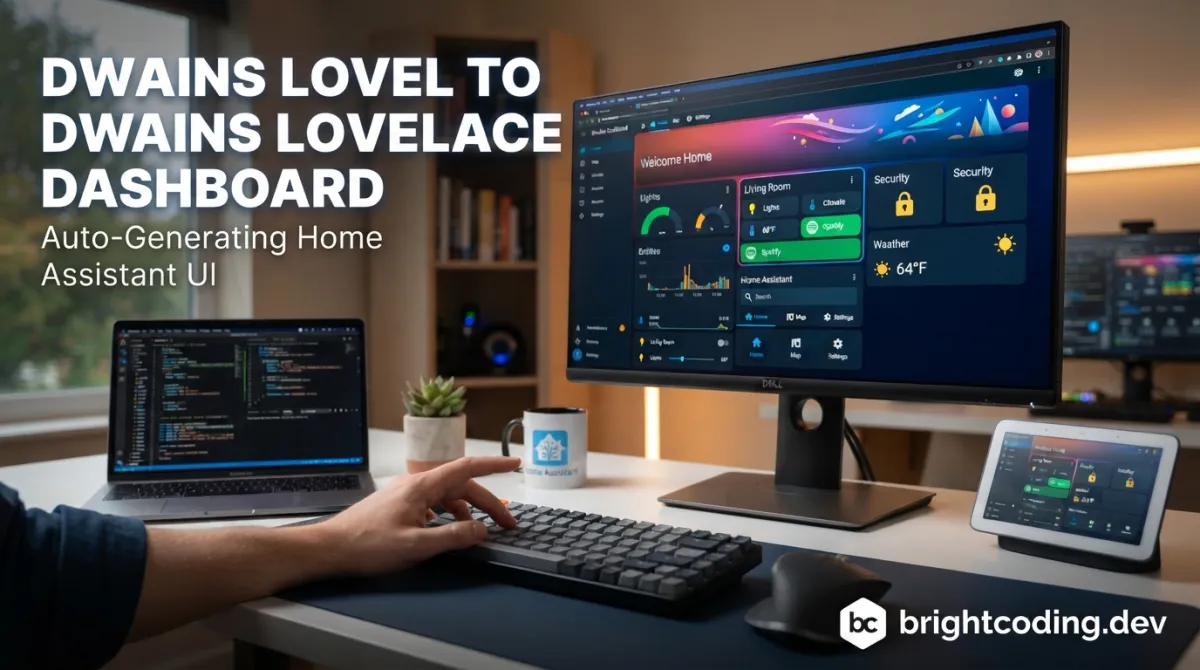
dwainscheeren/dwains-lovelace-dashboard: Auto-Generating Home Assistant UI
Building a polished Home Assistant dashboard traditionally demands hours of manual YAML configuration, custom card tuning, and responsive layout adjustments across desktop, tablet, and mobile form factors. For developers and smart home enthusiasts who would rather spend time automating their environment than fighting frontend boilerplate, dwainscheeren/dwains-lovelace-dashboard offers a fundamentally different approach: a fully auto-generating dashboard that constructs itself from minimal configuration input. With over 2,000 GitHub stars and a mature v3.9.3 release, this JavaScript↗ Bright Coding Blog-based dashboard has become a notable fixture in the Home Assistant ecosystem—though its future now lies with the successor project, Dwains Dashboard Next.
What is dwainscheeren/dwains-lovelace-dashboard?
dwainscheeren/dwains-lovelace-dashboard is an open-source, auto-generating dashboard layer for Home Assistant, created by Dwain Scheeren, a web developer and long-time Home Assistant user. The project emerged from a straightforward observation in 2019: despite Home Assistant's powerful backend, no existing solution could produce a complete, responsive UI with only minimal configuration.
The dashboard is built primarily in JavaScript and distributed under a custom license (listed as "Other" in repository metadata). It targets three device categories—desktop, tablet, and mobile—with adaptive layouts that eliminate the need for separate dashboard configurations per screen size.
As of June 2026, the repository contains the DD3 source files following the v3.9.3 release. However, this marks a transition point rather than continued expansion: DD3 is no longer under active feature development and will be phased out gradually. Active development has shifted to Dwains Dashboard Next, currently in alpha. The maintainer has closed older issues as part of tracker cleanup, requesting that bug reporters verify against v3.9.x before filing new issues.
The project's community footprint includes 2,052 stars, 203 forks, and active support channels through Discord and the Home Assistant community forums. It is available via HACS (Home Assistant Community Store) as a default integration.
Key Features
Auto-Generation from Minimal Configuration
The core value proposition is reduction of manual setup. Rather than defining individual cards, layouts, and entity mappings in YAML, the dashboard constructs its interface automatically based on the entities and areas present in the Home Assistant instance. This addresses the typical pain point where dashboards drift out of sync as new devices are added.
Responsive, Multi-Device Support
The dashboard explicitly targets desktop, tablet, and mobile without requiring separate configuration files. The layout engine adapts card density, navigation patterns, and information hierarchy to each form factor—a significant time saver compared to maintaining parallel Lovelace configurations.
HACS Integration
Distribution through HACS as a default repository simplifies installation and updates for the majority of Home Assistant users who run HACS. The badge in the README confirms this status, indicating community vetting and ongoing compatibility maintenance.
Community Ecosystem
The project maintains active Discord and Home Assistant forum threads for support, plus a YouTube channel for video guidance. This infrastructure matters for developers evaluating whether a tool has sufficient community momentum for troubleshooting edge cases.
Open Source with Source Availability
The DD3 source files are now fully available in the repository, enabling inspection, fork-based customization, and educational use. The maintainer notes the project was built "as a free, open-source project in my spare time alongside my job."
Use Cases
Rapid Smart Home Deployment
For developers setting up Home Assistant instances for family members or clients, dwainscheeren/dwains-lovelace-dashboard eliminates the iteration cycle of "add device → manually update dashboard → test on phone → adjust layout." The auto-generation ensures new entities appear appropriately without intervention.
Multi-Device Household Management
Households with mixed device usage—wall-mounted tablets in kitchens, phones for remote access, desktops for detailed configuration—benefit from the unified responsive design. No separate "mobile view" maintenance is required.
Migration from Manual Lovelace Configurations
Users with sprawling, unmaintainable YAML dashboards can use DD3 as a clean-slate replacement. The maintainer provides a specific migration guide from v2 to v3, suggesting awareness of version fragmentation as a real operational concern.
Educational and Fork-Based Customization
With DD3 source now available, developers can study the auto-generation logic for building derivative dashboards or contributing to the ecosystem. The JavaScript codebase is accessible to frontend developers familiar with Home Assistant's frontend architecture.
Evaluation Pathway to DD Next
Current DD3 users can assess whether the alpha-state Dwains Dashboard Next meets their needs before committing to a long-term dashboard strategy. Running DD3 in parallel provides a stable baseline for comparison.
Installation & Setup
The README specifies a 3-step installation process with full documentation at the project's GitHub Pages site.
Step 1: Access Installation Documentation
Navigate to the official installation guide:
https://dwainscheeren.github.io/dwains-lovelace-dashboard/v3/information/installation.html
Step 2: Follow the 3-Step Installation
The README emphasizes simplicity: "It are only 3 steps!" (sic). The exact commands and HACS-based installation flow are documented at the URL above rather than inline in the README. For HACS users, this typically involves adding the custom repository (if not already in defaults), selecting Dwains Dashboard, and restarting Home Assistant.
Step 3: Verify and Configure
Post-installation, the dashboard auto-discovers entities. Minimal additional configuration is required per the project's design philosophy.
Upgrade Considerations
Users migrating from v1 or v2 must follow the dedicated upgrade guide:
https://dwainscheeren.github.io/dwains-lovelace-dashboard/v3/information/migrate-v2-to-v3.html
Skipping this step risks configuration incompatibilities given the architectural changes between major versions.
Real Code Examples
The README does not contain inline configuration code blocks or YAML snippets within the repository text itself. The project's approach is explicitly minimal-configuration, with auto-generation replacing manual entity declarations. Below are the relevant documentation references and architectural patterns as documented.
Installation Reference (URL-based)
The primary "code" in the README is the installation URL structure:
https://dwainscheeren.github.io/dwains-lovelace-dashboard/v3/information/installation.html#installation
This anchor-linked documentation represents the entry point for all setup. The #installation fragment suggests deep-linking to specific sections for sharing or bookmarking.
Migration Path Reference
For version upgrades, the documented path is:
https://dwainscheeren.github.io/dwains-lovelace-dashboard/v3/information/migrate-v2-to-v3.html#migrate-from-existing-dwains-dashboard-v2-installation-to-v3
The verbose anchor name indicates this was a common enough operation to warrant direct linking from external guides.
Badge/Shield Integration (HACS)
The README includes HACS badge markup demonstrating community store integration:
[](https://github.com/hacs/integration)
This pattern is standard for Home Assistant custom components and indicates the project has passed HACS inclusion criteria.
The absence of extensive inline configuration examples reflects the tool's design intent: users are not expected to write boilerplate YAML for standard operations. For customization patterns, the GitHub Pages documentation and community Discord are the authoritative sources.
Advanced Usage & Best Practices
Verify Against Latest 3.9.x Before Reporting Issues
The maintainer explicitly requests that bug reporters confirm issues on v3.9.x before opening new issues, given the tracker cleanup. This is operational hygiene for anyone running older patch versions.
Plan Migration to DD Next for New Features
Feature requests for DD3 are no longer accepted. Developers evaluating this project for new deployments should assess Dwains Dashboard Next directly, or plan a future migration path.
Respect License Restrictions
The README contains an explicit clause: "You are not allowed without my permission to resell, re-distribute or sell my dashboard!" This is stricter than typical open-source licenses. Commercial integrators should contact the maintainer directly for clarification.
Community Support Prioritization
For troubleshooting, the Home Assistant community thread and Discord server are the designated channels. GitHub issues are reserved for verified bugs on current versions.
Comparison with Alternatives
| Aspect | dwainscheeren/dwains-lovelace-dashboard | Manual Lovelace YAML | Mushroom / UI-Minimalist Cards |
|---|---|---|---|
| Configuration overhead | Minimal (auto-generating) | High (manual per card) | Medium (component-based) |
| Multi-device responsive | Built-in | Requires manual duplication | Partial (card-dependent) |
| Customization depth | Moderate (themeable, forkable) | Unlimited | High (modular components) |
| Active development | Maintenance mode (DD3); alpha (DD Next) | Core HA feature | Active community |
| Learning curve | Low initial, moderate for customization | High | Medium |
Manual Lovelace YAML offers maximum flexibility at the cost of ongoing maintenance. Mushroom and similar card collections provide middle-ground modularity but still require manual layout composition. dwainscheeren/dwains-lovelace-dashboard trades some customization depth for operational simplicity—appropriate for users prioritizing maintainability over pixel-perfect control.
FAQ
Is DD3 still maintained?
DD3 receives bug-fix maintenance through v3.9.x but no new features. Critical fixes may still arrive; architectural work has moved to DD Next.
Can I use this commercially?
The license explicitly prohibits resale or redistribution without permission. Contact the maintainer for commercial licensing clarification.
How do I migrate from v2?
Follow the dedicated migration guide at the documented URL. Do not attempt direct configuration file copying.
What if I find a bug in an older version?
Upgrade to v3.9.x first and reproduce. The maintainer has closed pre-existing issues en masse; only verified current-version bugs are accepted.
Is DD Next ready for production?
At time of writing, DD Next is in alpha. Production use requires risk assessment appropriate for pre-release software.
Does this replace standard Lovelace?
It operates as a dashboard layer within Home Assistant. Standard Lovelace remains accessible for specialized views.
What frontend technologies does it use?
JavaScript is the primary language per repository metadata, consistent with Home Assistant's frontend stack.
Conclusion
dwainscheeren/dwains-lovelace-dashboard solved a genuine friction point in the Home Assistant ecosystem: the tedium of building and maintaining responsive dashboards across multiple devices. Its auto-generating approach, mature v3.9.3 release, and established community support channels make it a viable choice for users seeking operational simplicity over granular control.
The project now sits at an inflection point. DD3 is stable but static; future investment belongs to Dwains Dashboard Next. New adopters should evaluate both projects against their timeline and risk tolerance. For existing users, the source availability ensures continuity even as official feature development concludes.
The tool suits developers and smart home enthusiasts who value maintainability, households with diverse device form factors, and anyone who has watched a meticulously crafted YAML dashboard decay into technical debt. It is less appropriate for users requiring deep customization without forking, or those seeking cutting-edge active development in the mainline repository.
Explore the repository, review the installation documentation, and join the community channels to determine fit for your Home Assistant deployment: https://github.com/dwainscheeren/dwains-lovelace-dashboard
Outils recommandés
Explore on the BrightCoding network
Hand-picked resources from our other sites.
IAmTomShaw/f1-race-replay: Interactive F1 Telemetry Visualization in Python
IAmTomShaw/f1-race-replay is a Python application for interactive Formula 1 race visualization and telemetry analysis, built with FastF1 and Arcade. Features in...
Textualize/textual: Cross-Platform Terminal UIs with Pure Python
Textualize/textual is a 36,621-star MIT-licensed Python framework for building terminal and web user interfaces with a simple, modern API. Features include CSS-...
Smart Home Automation Explained: How to Turn Your House into an Intelligent Home
That’s smart home automation, and the good news is you don’t need a contractor, a soldering iron, or a second mortgage to get there.
Continuez votre lecture
Why Alexandrie is the Ultimate Markdown Note-Taking App

Why CrossPaste is the Ultimate Game Changer for Clipboard Management
Why Chandra is the Ultimate OCR Tool for Handwriting and Tables

Stop Coding Alone: OPC-Skills Gives Your AI Agent Superpowers
Commentaires 0
Aucun commentaire pour l'instant. Soyez le premier à réagir !