Greedeks/GTweak: Portable Windows Hardening and Debloating Tool
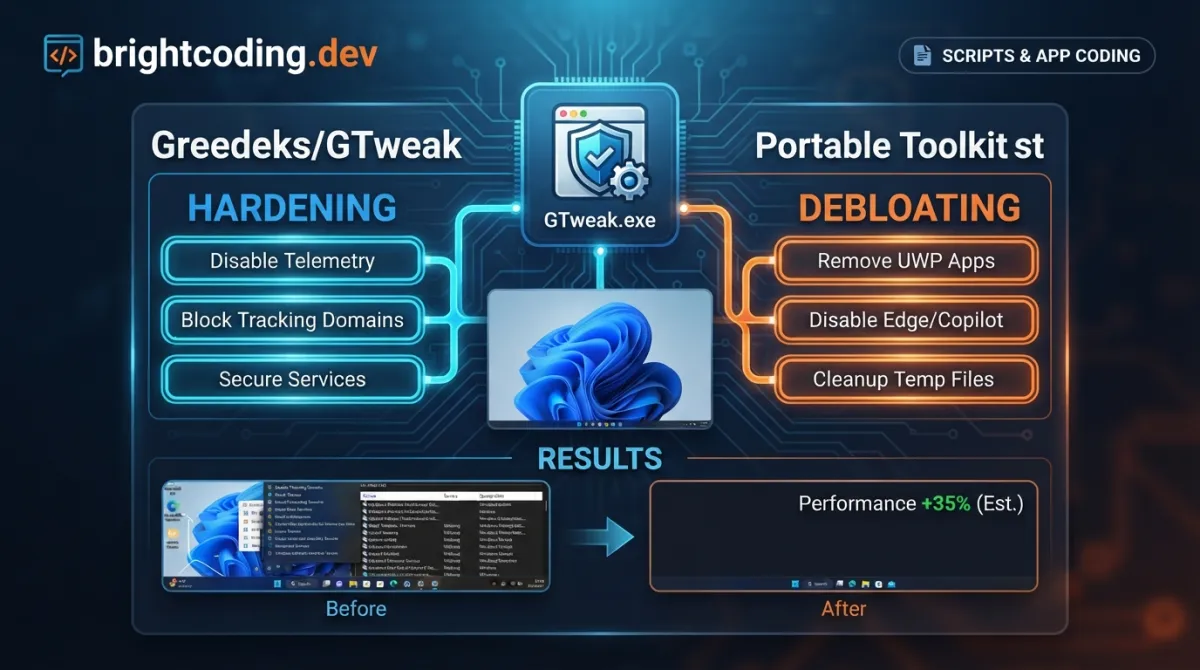
Greedeks/GTweak: Portable Windows Hardening and Debloating Tool
Managing Windows systems often means wrestling with unwanted telemetry, pre-installed bloatware, and aggressive data collection that ships by default. For developers, power users, and IT administrators who need clean, predictable environments, the stock Windows experience creates friction—unnecessary services consume resources, background telemetry raises privacy concerns, and modern "features" like Copilot and Recall introduce attack surfaces many would prefer to eliminate. Greedeks/GTweak addresses this directly: a portable, open-source C# utility that strips Windows down to essentials while providing granular control over activation, privacy, and system behavior. With 1,342 GitHub stars and active maintenance through July 2026, it represents a pragmatic approach to Windows system administration without the overhead of complex deployment pipelines.
What is Greedeks/GTweak?
Greedeks/GTweak is a portable Windows configuration utility written in C# and distributed under the BSD 3-Clause "New" or "Revised" License. The project is maintained by Greedeks and targets official Windows 10 and 11 installations (build 18362.116 and later), requiring only .NET Framework 4.8 to run. Unlike installation-based system tweakers that leave registry debris or require ongoing background services, GTweak operates as a single executable—download, run, and remove when finished.
The tool occupies a specific niche in the Windows ecosystem: it bridges the gap between manual PowerShell scripting (time-consuming, error-prone) and closed-source "Windows optimizers" of questionable provenance. With 104 forks and community translations across 14 languages, the project demonstrates sustained interest from a global user base. Its last commit date of July 13, 2026 indicates active maintenance, critical for a tool that must adapt to Microsoft's semi-annual Windows feature updates.
GTweak's architecture leverages several NuGet packages for its implementation: TaskScheduler for Windows Task Scheduler manipulation, Costura.Fody for IL merging into a single executable, Newtonsoft.Json for configuration handling, Ookii.Dialogs.Wpf for native Windows dialog presentation, and WPF-UI for its modern interface layer. It also references the Windows FirewallAPI directly for network-level blocking capabilities.
Key Features
GTweak organizes its functionality into discrete categories accessible through a WPF-based interface. The feature set reflects a comprehensive approach to Windows system modification:
System Activation and Licensing: The tool supports Windows activation via HWID (Hardware ID) and KMS (Key Management Service) methods. This addresses environments where legitimate activation channels are unavailable or where automated deployment requires scripting-friendly activation paths.
Security Component Management: Users can disable Windows Defender, SmartScreen, Antimalware Service, Virtualization-Based Security (VBS), and User Account Control (UAC). These are destructive, irreversible-equivalent changes intended for isolated environments or specialized workflows where traditional security boundaries are managed externally.
Telemetry and Data Collection Suppression: GTweak targets telemetry across multiple vendors—Microsoft (Windows keyloggers, diagnostic tools, scheduled data collection tasks), NVIDIA, and Intel. It blocks Microsoft's shadow domains via hosts file modification and Windows Firewall rules, disables personalized advertising systems including SCOOBE (Second Chance Out-of-Box Experience), and removes data collection scheduled tasks.
Bloatware and Application Removal: The utility uninstalls OneDrive and Microsoft Edge (including WebView2 runtime and associated data), removes standard pre-installed UWP applications from Windows 10/11, and disables AI assistants: Cortana, Copilot, and Recall. This addresses the cumulative storage and update burden these components impose.
System Service and Protocol Hardening: Unused services, Teredo/ISATAP/IPv6 protocols, built-in diagnostic tools, and disk defragmentation can be disabled. The tool also applies the "Ultimate Performance" power plan and adjusts Realtek HD Audio power settings to resolve latency issues.
Interface and Input Customization: Theme modification, window behavior, taskbar layout, icon adjustments, and keyboard/mouse settings (filter keys, sticky keys, pointer acceleration) are configurable.
Maintenance and Diagnostics: Hardware configuration viewing, system component monitoring, NTFS compression/decompression, RAM clearing, temporary file cleanup, icon cache rebuilding, secure Windows.old deletion, and custom script execution with TrustedInstaller privileges.
Use Cases
Development Environment Preparation: When provisioning Windows workstations for software development, GTweak eliminates the variability introduced by pre-installed applications and telemetry services. A developer can script GTweak execution as part of environment setup, ensuring consistent base states across machines without maintaining extensive PowerShell modules.
Privacy-Focused Personal Systems: Users concerned with data collection can systematically disable telemetry pipelines rather than relying on scattered registry edits or third-party privacy tools of uncertain operation. The hosts-file and firewall-based domain blocking provides network-level enforcement complementing OS-level disables.
Gaming and Low-Latency Workstations: The combination of Ultimate Performance power plan, Realtek audio latency fixes, service disabling, and notification suppression creates optimized environments where background processes cannot interrupt time-sensitive applications.
Virtual Machine and Container Base Images: For organizations building Windows container or VM images, GTweak reduces image size through UWP removal and NTFS compression while eliminating components that generate unnecessary log volume or network traffic in headless deployments.
Legacy System Maintenance: On older hardware where Windows 10/11's default service footprint causes performance degradation, selective disabling of diagnostic tools, defragmentation services, and unnecessary protocols can recover usable responsiveness.
Installation & Setup
GTweak requires no traditional installation. The distribution model is single-executable portability:
# Download the latest release directly
curl -L -o gtweak.exe https://github.com/Greedeks/GTweak/releases/latest/download/gtweak.exe

# Or retrieve via browser from the releases page
# https://github.com/Greedeks/GTweak/releases/latest
Prerequisites verification:
# Confirm .NET Framework 4.8 is installed (Windows 10 1903+ includes this by default)
Get-ItemProperty "HKLM:SOFTWARE\Microsoft\NET Framework Setup\NDP\v4\Full\" | Select-Object Version, Release

# Expected: Release value >= 528040 indicates 4.8 or later
Execution requirements:
The README explicitly warns: "Before using the software, disable your antivirus. If you are using Windows Defender, add the program to its exclusions." This requirement stems from the tool's behavior—disabling security components, modifying system services, and altering firewall rules triggers heuristic detection by virtually all antivirus engines.
# Add exclusion for Windows Defender (run as Administrator)
Add-MpPreference -ExclusionPath "C:\Tools\gtweak.exe"

# Or via Windows Security GUI: Virus & threat protection > Exclusions > Add
System compatibility boundary:
// From README: Windows support since 10 (build 18362.116)
// Windows 11 is supported; Windows 10 builds prior to 1903 (18362) are not
// Requires: .NET Framework 4.8 installed platform
The tool is explicitly designed for official Windows images from trusted sources. Modified or "trimmed" Windows distributions are unsupported, and functionality on such systems is at user risk.
Real Code Examples
The README presents GTweak's capabilities as structured lists rather than executable code samples. The following represents the documented feature taxonomy, formatted for clarity:
// Feature categories from README — these describe operational domains,
// not a configuration syntax. The tool provides GUI toggles for each.

- Activating Windows using HWID and KMS methods;
- Disabling Windows Defender, SmartScreen, Antimalware, VBS, and UAC;
- Disabling/pausing Windows updates and removing temporary update files;
- Disabling unused and unnecessary system services;
- Disabling keyloggers and telemetry for Windows, NVIDIA, and Intel;
- Disabling services and events related to the collection of user data;
- Disabling data collection tasks in the Windows Task Scheduler;
- Disabling unnecessary network protocols: Teredo, ISATAP, and IPv6;
- Disabling built-in Windows diagnostic tools and disk defragmentation;
- Disabling personalized ads and system banners in Windows, including SCOOBE;
- Disabling system notifications, recommendations, and tips in Windows;
- Blocking Microsoft's shadow domains that collect data via hosts and firewall;
- Uninstalling OneDrive and Microsoft Edge along with clearing all associated data and WebView2;
- Removing standard pre-installed UWP apps in Windows 10/11;
- Removing and disabling AI assistants: Cortana, Copilot, and Recall;
- Customizing the interface: changing themes, window settings, taskbar layout, and icons;
- Configuring keyboard and mouse settings: disabling key filtering, sticky keys, and pointer acceleration;
- Adjusting Windows settings and applying the ultimate performance power plan;
- Adjusting power settings for Realtek High Definition Audio drivers to fix sound delay;
- Viewing the hardware configuration and monitoring system components;
- Compressing and decompressing files and directories using NTFS to save space;
- Clearing RAM, temporary files, icon caches, and securely deleting the Windows.old folder;
- Executing custom scripts (.ps1, .cmd, .bat, .reg) with TrustedInstaller privileges.
This list serves as the authoritative feature specification. Each semicolon-terminated item corresponds to implemented functionality accessible through the utility's categorized interface (Utilities, Confidentiality, Interface, Applications, Services, System, Addons, Toolset).
// System requirements specification from README
Windows support: since 10 (build 18362.116)
Installed platform: .NET Framework 4.8
The build number 18362 corresponds to Windows 10 version 1903 (May 2019 Update), establishing the minimum supported feature set including Windows Sandbox, improved Windows Update controls, and refined telemetry APIs that GTweak manipulates.
<!-- Translation structure: Localize.xaml files per language code -->
<!-- Example from translation contribution guidelines -->
<Languages>
  <Language Code="en" Name="English" />
  <Language Code="fr" Name="Français" />
  <Language Code="ko" Name="한국어" />
  <!-- Regional variants use language-region format: pt-br, zh-cn, etc. -->
</Languages>
The localization system uses XAML resource dictionaries, with LanguageCatalog.xaml serving as the registry of supported translations.
Advanced Usage & Best Practices
Operational sequencing matters: Disable telemetry collection before removing associated services to prevent orphaned event logs or failed service dependencies. The tool's categorized interface (Confidentiality before Services) reflects this logical ordering.
System restore point creation: While not explicitly documented in the README, the destructive nature of component removal (Edge, OneDrive, UWP apps) warrants pre-execution backup. Windows System Restore or disk imaging provides recovery paths for configurations that prove unstable.
Script execution with TrustedInstaller: The .ps1, .cmd, .bat, .reg execution capability elevates beyond Administrator to the TrustedInstaller security context. This bypasses permission boundaries for protected system files but requires extreme caution—malicious or erroneous scripts gain unrestricted access.
Update handling strategy: The Windows Update disable/pause functionality requires deliberate management. Security-critical environments should implement alternative patching workflows (WSUS, manual cumulative updates) rather than indefinite deferral.
Network protocol considerations: IPv6, Teredo, and ISATAP disabling improves security surface reduction but may break applications dependent on IPv6 transition technologies or modern networking stacks. Verify application compatibility before permanent disablement.
Comparison with Alternatives
| Tool | Approach | Key Difference | Trade-off |
|---|---|---|---|
| Greedeks/GTweak | Portable GUI executable, comprehensive system modification | Single-file portability, TrustedInstaller script execution, active multilingual community | Requires antivirus exclusion; no command-line automation documented |
| Chris Titus Tech's Windows Utility | PowerShell-based, open-source | Script transparency, extensive community testing, active YouTube documentation | Requires execution policy changes, less granular per-feature toggling |
| O&O ShutUp10++ | Freeware (closed source), focused privacy | Established reputation, reversible changes with clear indicators | Closed source, limited to privacy (no activation, bloatware removal, service management) |
| Sophia Script | PowerShell module, extensive configuration | Deep customization, active GitHub maintenance | Steeper learning curve, requires PowerShell proficiency |
GTweak distinguishes itself through portability without installation and breadth beyond privacy alone—incorporating activation support, hardware monitoring, and NTFS maintenance tools that alternatives typically exclude. However, its closed-source distribution model (compiled executable despite open-source licensing) may concern users who prefer to audit execution logic directly. The Sophia Script and CTT alternatives offer fully transparent PowerShell implementations at the cost of operational complexity.
FAQ
Does GTweak work on Windows 11? Yes, Windows 10 build 18362.116 and all subsequent versions including Windows 11 are supported.
Is the source code available for audit? The project is BSD 3-Clause licensed with source in the repository, though distribution is via compiled executable.
Why does antivirus flag GTweak? Behavioral detection triggers on security component disabling and system modification capabilities; this is expected and requires manual exclusion.
Can changes be reverted? The README does not document reversible operation; many changes (app removal, service disable) are destructive. Plan backups accordingly.
Does it support automated/silent deployment? No silent or CLI operation is documented; the tool is GUI-interactive.
What languages are available? 14 community translations including English, French, Hebrew, Hungarian, Italian, Korean, Polish, Portuguese (BR), Russian, Slovenian, Thai, Turkish, Ukrainian, and Chinese (TW).
How do I contribute a translation?
Fork the repository, translate Localize.xaml from the English base, add your language code folder, update LanguageCatalog.xaml, and submit a pull request.
Conclusion
Greedeks/GTweak serves a specific, well-defined need: rapid Windows system hardening and debloating through a portable, self-contained interface. For developers building consistent environments, privacy-conscious users seeking granular telemetry control, and administrators preparing deployment images, it consolidates dozens of manual operations into a single execution context. The 1,342-star community, active maintenance through mid-2026, and broad language support indicate sustained relevance.
The tool is not universally appropriate—environments requiring reversible changes, organizations with strict source-audit requirements, or users uncomfortable with antivirus exclusions should evaluate PowerShell-based alternatives. For those prioritizing operational speed and comprehensive scope over incremental transparency, GTweet delivers documented functionality without deployment overhead.
Explore the latest release, review the source repository, or contribute to community translations to extend accessibility. For related Windows automation approaches, see [INTERNAL_LINK: PowerShell system administration best practices].
Explore on the BrightCoding network
Hand-picked resources from our other sites.
json87/SphereSfM: 3D Reconstruction from Spherical ERP Images
json87/SphereSfM extends COLMAP for native sparse 3D reconstruction of spherical ERP images from cameras like Insta360 and Ricoh Theta, with integrated cubic co...
zevorn/rt-claw: Low-Cost AI Assistant for Embedded Devices
zevorn/rt-claw is a C-based AI assistant framework for embedded devices, bringing LLM chat, tool use, and swarm intelligence to $1 hardware across FreeRTOS, RT-...
IAmTomShaw/f1-race-replay: Interactive F1 Telemetry Visualization in Python
IAmTomShaw/f1-race-replay is a Python application for interactive Formula 1 race visualization and telemetry analysis, built with FastF1 and Arcade. Features in...
Continuez votre lecture
Why Alexandrie is the Ultimate Markdown Note-Taking App
Why CrossPaste is the Ultimate Game Changer for Clipboard Management
Why Chandra is the Ultimate OCR Tool for Handwriting and Tables

Stop Coding Alone: OPC-Skills Gives Your AI Agent Superpowers
Commentaires 0
Aucun commentaire pour l'instant. Soyez le premier à réagir !