Is Higgsfield Open Source? What Actually Shipped, and the Real Alternatives You Can Self-Host
If you searched for “Higgsfield open source,” you probably saw a GitHub link, a CEO tweet, or a YouTube video claiming that Higgsfield released its code. The truth is more complicated, and more interesting, than a simple yes or no.
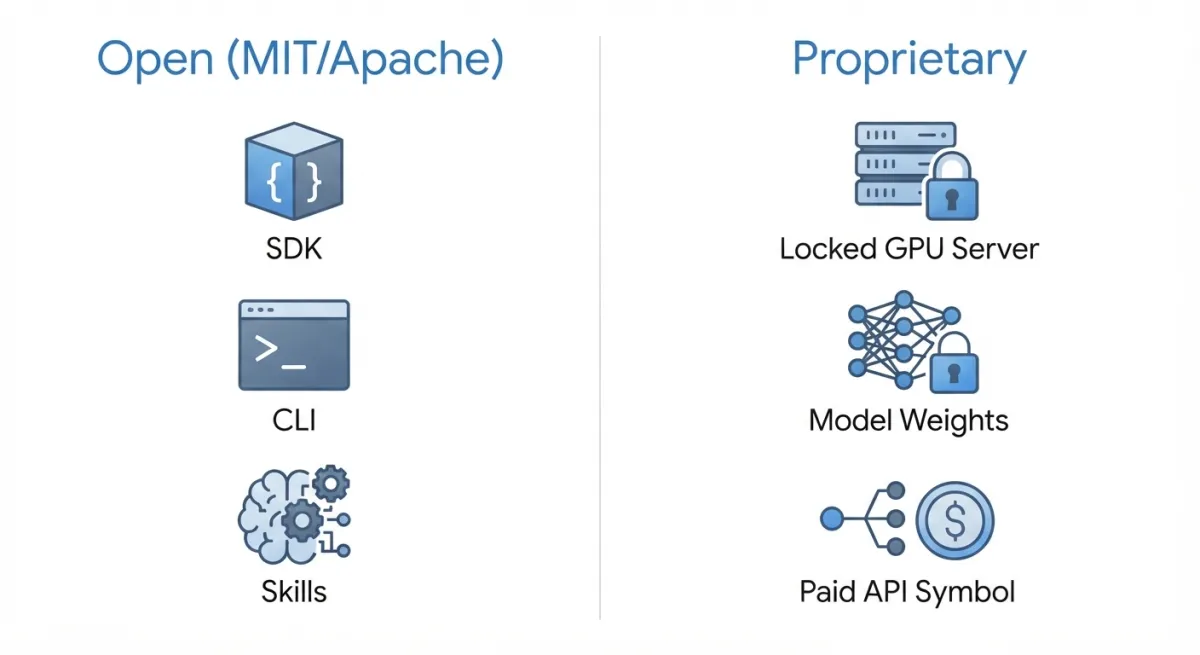
Higgsfield is a powerful AI video generation platform used by agencies, studios, and Fortune 500 teams. It can produce cinematic clips with camera controls, character consistency, and native audio. But Higgsfield’s core models and generation platform are proprietary. What the company published on GitHub is tooling: SDKs, a CLI, and “skills” that call its paid API. The model weights, training pipelines, and inference engines are not open.
That distinction matters enormously if your goal is to run AI video generation locally, without a subscription, or without sending data to a third-party API.
In this guide, you’ll learn exactly what Higgsfield open-sourced, why the “open source” label is misleading, and, more importantly, which genuine open-source video models you can self-host today, with hardware requirements, installation steps, and a practical comparison table.
What Is Higgsfield, and What Does It Actually Do?
Higgsfield is an AI-native creative production suite. Instead of being a single model, it routes your request across more than 35 image, video, audio, and language models, including its own in-house models and third-party engines. Its flagship Cinema Studio 4.0 generates clips up to 30 seconds, with control over genre, era, camera body, lens, aperture, camera movement, lighting, color palette, and character emotion. It also supports up to 50 reference assets per generation and outputs up to 1080p in the web app.
On the surface, it looks like the kind of tool a developer might want to fork, extend, or run on their own GPU. That is exactly why the “open source” question keeps coming up.
The “Higgsfield Open Source” Claim: What Is Real and What Is Not
What Higgsfield actually released
Higgsfield’s GitHub organization does contain real repositories. The most visible is higgsfield-ai/skills, which carries an MIT License and ships SDKs, a CLI, and agent-callable “skills”. There is also a Python↗ Bright Coding Blog SDK, a Node.js/TypeScript SDK, and a CLI for its API.
These are legitimate open-source tools. But they are client-side wrappers. They help you call Higgsfield’s models programmatically. They do not contain the models themselves.
What is not open
Higgsfield’s CEO publicly said “Go build your own Higgsfield” and released code on GitHub. But technical reviewers who inspected the repository concluded that what shipped was a thin UI calling a paid API: “no weights, no training, no way to build anything without paying them”. A widely shared LinkedIn analysis put it plainly: “The models and the platform are still proprietary. What’s on GitHub is the tooling, and it needs a paid API key to generate anything”.
So the accurate answer to “Is Higgsfield open source?” is:
- The tooling: Open (MIT/Apache).
- The models: Closed.
- The platform: Closed, paid API required for generation.
This is sometimes called “open-washing”: using open-source language to attract developers while keeping the core technology proprietary. It is not the same as releasing model weights under a permissive license.
What about the “Open-Higgsfield-AI” repositories?
You will find several GitHub projects with names like Open-Higgsfield-AI, Open-Higgsfield, and Open-Generative-AI. These are third-party alternatives or front-end clones, not official Higgsfield releases. Some are MIT-licensed and self-hostable, but they typically either wrap other models or require you to bring your own API keys. They are useful starting points for a UI, but they are not a way to reproduce Higgsfield’s internal models.
Why Genuine Open-Source Video Generation Matters
Even though Higgsfield’s models are closed, the open-source ecosystem has caught up fast. In 2026, you no longer need a data-center GPU to generate video locally. A single consumer GPU, sometimes even a 12 GB card with quantized weights, can run models that produce usable clips.
Genuine open-source video models give you three things a closed API cannot:
- Data control: Your prompts, images, and outputs never leave your machine.
- Customization: You can fine-tune, quantize, and embed the model in your own product.
- Cost predictability: No per-credit billing. You pay for hardware, not generations.
The trade-off is operational complexity: you manage dependencies, VRAM, model downloads, and quality tuning yourself.
The Real Open-Source Alternatives: A Comparison
Here are the most practical open-source video generation models you can self-host, based on current community adoption and documentation.
| Model | Developer | Parameters / Size | License | Best for | VRAM (local) |
|---|---|---|---|---|---|
| CogVideoX / CogVideoX1.5 | Tsinghua / Zhipu AI | 5B | Custom open license | Most complete ComfyUI ecosystem; LoRA fine-tuning | ~6 GB with CPU offload; ~16 GB recommended; ~40 GB without offload |
| Open-Sora 2.0 | HPC-AI Tech | 11B | Fully open (checkpoints + training code) | Research, custom training, reproducing Sora-style pipelines | 24 GB+ VRAM recommended; 52-60 GB peak for high-res |
| Stable Video Diffusion (SVD) | Stability AI | ~1.5B | Open (research/commercial depending on release) | Image-to-video; richest community plugins | 8-16 GB depending on resolution and offloading |
| HunyuanVideo 1.5 | Tencent | 8.3B / 13B | Open | Best visual quality among open models | 24 GB class; 11 GB with GGUF Q5 quantization |
| LTX-Video | Lightricks | Smaller than 5B | Open | Near-real-time generation; 16 GB VRAM friendly | 16 GB VRAM |
| Wan 2.1 / Wan 2.2 | Alibaba | Varies | Open | Strong Chinese-language support; control models | Varies by variant |
| Mochi 1 | Genmo | 10B | Apache 2.0 | Commercial use; strong physics | 24 GB+ (quantized variants lower) |
Source: Model capabilities and hardware notes synthesized from official repositories and community landscape summaries.
For most developers getting started, CogVideoX + ComfyUI is the fastest path to a working local pipeline. For teams that need the highest open-weight quality, HunyuanVideo 1.5 is the current quality ceiling. For research and full training reproducibility, Open-Sora 2.0 is the most transparent option.
Step-by-Step: Run Open-Source Video Generation Locally with ComfyUI and Stable Video Diffusion
This walkthrough uses ComfyUI + Stable Video Diffusion because it is the most beginner-friendly stack and works on a wide range of GPUs. The same ComfyUI workflow can later be extended to CogVideoX or HunyuanVideo nodes.
Prerequisites
- OS: Linux (Ubuntu 22.04+ recommended) or Windows with WSL2.
- GPU: NVIDIA GPU with at least 8 GB VRAM (16 GB+ recommended). AMD and Apple Silicon work but require different backends and are outside this guide.
- Driver: NVIDIA driver 550 or newer, with a CUDA-compatible toolkit.
- Python: 3.10 or newer.
- Disk: At least 20 GB free for ComfyUI, dependencies, and model weights.
Verify your GPU is visible:
nvidia-smi
You should see your GPU name, driver version, and CUDA version. If this command fails, fix your driver installation before continuing.
Step 1: Install ComfyUI
git clone https://github.com/comfyanonymous/ComfyUI.git
cd ComfyUI
pip install -r requirements.txt
ComfyUI is a node-based interface for diffusion models. Think of it as a visual programming environment: you wire together model loaders, samplers, and output nodes instead of writing inference code from scratch.
Step 2: Install the Stable Video Diffusion custom node
The easiest way is through ComfyUI Manager:
- Launch ComfyUI.
- Open Manager → Install Custom Nodes.
- Search for “ComfyUI Stable Video Diffusion” (author:
thecooltechguy). - Install and restart ComfyUI.
Alternatively, install manually:
cd ComfyUI/custom_nodes/
git clone https://github.com/thecooltechguy/ComfyUI-Stable-Video-Diffusion
cd ComfyUI-Stable-Video-Diffusion
python install.py
This installs the nodes that wrap SVD’s image-to-video pipeline.
Step 3: Download the SVD model weights
Download the SVD checkpoint from Stability AI’s official Hugging Face repository and place it in:
ComfyUI/models/checkpoints/
Do not download model weights from random mirrors. Use the official stabilityai organization on Hugging Face or the repository linked from Stability’s GitHub.
Step 4: Build the workflow
- In ComfyUI, load the SVD example workflow from the custom node’s
examplesfolder, or create a minimal graph:- Load Image node → SVD Model Loader → SVD Sampler → Video Combine node.
- Upload a still image as the starting frame.
- Set the number of frames. Start with 14-25 frames for a short clip.
- Set resolution to 576×1024 or 1024×576 for the first run. Higher resolutions increase VRAM use.
- Queue the prompt.
SVD is an image-to-video model, meaning it animates a still image rather than generating from text alone. This makes it well suited for product shots, portrait animation, and turning concept art into motion.
Step 5: Reduce VRAM if you hit out-of-memory errors
If ComfyUI crashes with a CUDA out-of-memory error, try these settings in order:
- Lower the frame count to 14.
- Lower resolution to 512×512.
- Enable sequential CPU offload in the SVD node settings. This is slower but uses far less VRAM.
- Use a quantized or FP16 checkpoint if available.
For a deeper walkthrough of ComfyUI + SVD deployment, including Docker↗ Bright Coding Blog-based setups, see community guides that cover CUDA driver installation and port mapping.
Practical Use Cases for Self-Hosted Video Generation
1. Product animation for e-commerce
Animate a still product photo into a short, looping clip for a landing page or ad. Because the model runs locally, you can process hundreds of SKUs without per-generation API costs. SVD’s image-to-video strength makes this workflow practical.
2. Pre-visualization for filmmakers
Use CogVideoX or HunyuanVideo to generate rough motion tests from storyboard frames. You keep full control over the data, which is important when working under NDA with unreleased scripts or client footage.
3. Fine-tuned character consistency
CogVideoX supports LoRA fine-tuning on a single RTX 4090 with the right framework, making it possible to train a character or style adapter without a cluster. This is something you cannot do with a closed API like Higgsfield’s.
4. Research and model evaluation
Open-Sora 2.0 ships full training code and checkpoints, making it the most reproducible open pipeline for studying video diffusion at scale.
Advantages and Disadvantages of Going Open Source Instead of Higgsfield
Advantages
- No credit system: You are not billed per second of video. Your marginal cost is electricity and hardware time.
- Full data privacy: Prompts and images stay local. This matters for healthcare, legal, and enterprise clients.
- Customization: Fine-tune, quantize, distill, and embed the model in your own application.
- No vendor lock-in: You can switch models without renegotiating a subscription.
- Transparency: You can inspect the license, the weights, and the training code.
Disadvantages
- Hardware cost: A capable GPU (24 GB VRAM class) costs significantly more than a year of Higgsfield’s Plus plan ($49/month).
- Operational overhead: You manage CUDA drivers, dependencies, model downloads, and upgrades.
- Quality gap: Closed models like Higgsfield’s Cinema Studio 4.0 still offer more polished camera controls, native audio, and multi-model routing than most single open-source models.
- Support: There is no customer success team. You rely on GitHub issues and community forums.
- Licensing nuance: Some “open” models have custom licenses that restrict commercial use. Always read the license file, not just the README.
Common Problems and Troubleshooting
| Problem | Likely cause | Fix |
|---|---|---|
CUDA out of memory |
Resolution or frame count too high | Lower frames to 14, enable CPU offload, use FP16/quantized weights |
nvidia-smi not found |
Driver not installed or WSL GPU passthrough disabled | Install proprietary NVIDIA driver; on WSL2, install the Windows driver with WSL support |
| ComfyUI node missing after install | Custom node failed to load | Check the ComfyUI console for import errors; reinstall the node and restart |
| Model generates static or distorted video | Image-to-video model given a low-detail or flat input | Use a higher-quality starting image; increase motion bucket ID cautiously |
| Very slow generation | CPU offload enabled or insufficient VRAM | Accept slower speed, or upgrade GPU; LTX-Video is a faster alternative |
| License violation risk | Commercial use of a research-only checkpoint | Verify the license on Hugging Face or the official repository before deploying |
Security, Privacy, and Best Practices
- Download weights only from official sources. Prefer the
stabilityai,THUDM,Tencent, andhpcaitechorganizations on Hugging Face or their linked GitHub releases. Avoid unofficial mirrors. - Treat model licenses as legal documents. “Open source” does not always mean “free for commercial use.” Some checkpoints are research-only.
- Sandbox your inference environment. Run ComfyUI in a Docker container or a dedicated virtual environment to isolate dependencies.
- Do not expose ComfyUI directly to the public internet. It has no built-in authentication and is designed for local or trusted-network use. Put it behind a reverse proxy with authentication if remote access is required.
- Audit outputs before publishing. Open models can reproduce biases or generate unexpected content. Human review remains essential.
Frequently Asked Questions
Is Higgsfield open source?
No. Not in the sense that matters for self-hosting. Higgsfield’s tooling (SDKs, CLI, skills) is open under MIT/Apache licenses, but its models and generation platform are proprietary and require a paid API key.
Can I download Higgsfield’s model weights?
Higgsfield has not released its model weights. The repositories on GitHub contain client libraries and UI components, not the generative models.
What is the best open-source alternative to Higgsfield?
It depends on your priority. CogVideoX offers the most mature ComfyUI ecosystem and fine-tuning support. HunyuanVideo 1.5 delivers the best open-weight visual quality. Open-Sora 2.0 is best for research and full training reproducibility.
Can I run open-source video generation on a consumer GPU?
Yes. Stable Video Diffusion and quantized CogVideoX variants can run on 8-12 GB VRAM with CPU offloading. For comfortable performance at higher resolutions, a 16-24 GB GPU is recommended.
Is “Open-Higgsfield-AI” on GitHub the same as Higgsfield?
No. Repositories with names like Open-Higgsfield-AI are third-party clones or alternatives. They are not affiliated with Higgsfield and do not contain Higgsfield’s models.
Do open-source video models allow commercial use?
Not always. Some are released under research-only licenses. Check the license file in the official repository before using outputs commercially.
How long does it take to generate a video locally?
On a 24 GB GPU, a short 3-5 second clip with a model like LTX-Video can take under a minute. Larger models and higher resolutions can take several minutes per clip.
Can I fine-tune an open-source video model?
Yes. CogVideoX supports LoRA fine-tuning on a single RTX 4090, and Open-Sora provides full training code. Fine-tuning requires additional VRAM and dataset preparation.
Is Higgsfield’s API cheaper than self-hosting?
For low-volume use, Higgsfield’s $15-$49/month plans are far cheaper than buying a GPU. Self-hosting becomes cost-effective at high volume or when data privacy is non-negotiable.
What happened to Higgsfield’s “build your own” bounty?
Higgsfield announced a $50,000 bounty for building a useful competitor on its API, but the models remain proprietary. The initiative is best understood as encouraging developers to build on Higgsfield, not to fork it.
Final Thoughts
The Higgsfield open source story is a useful case study in reading beyond the headline. Higgsfield opened its tooling, not its models. That is a legitimate business strategy, but it is not the same as releasing a self-hostable AI video generator.
If your goal is to run video generation on your own terms, without per-credit billing, without sending data to an API, and with the freedom to fine-tune, the genuine open-source ecosystem is ready. Start with ComfyUI + Stable Video Diffusion to learn the workflow, then move to CogVideoX for fine-tuning or HunyuanVideo 1.5 for maximum open-weight quality.
Your next step: install ComfyUI, run the SVD workflow in this guide, and generate a 14-frame clip from a still image. Once that works, you have a foundation you can extend to any open video model, with no subscription required.
C. Visual Content Recommendations
Image 1: Higgsfield “open source” reality check diagram
- Placement: Immediately after the section “The ‘Higgsfield Open Source’ Claim: What Is Real and What Is Not.”
- Prompt: “Clean technical diagram split into two columns. Left column labeled ‘Open (MIT/Apache)’ showing SDK, CLI, and skills icons. Right column labeled ‘Proprietary’ showing a locked GPU server, model weights icon with a padlock, and a paid API symbol. Flat vector style, blue and gray palette, white background, no text other than column labels.”
- Filename:
higgsfield-open-source-open-vs-proprietary.webp - ALT: “Diagram showing that Higgsfield’s SDKs and CLI are open source, while its model weights and generation platform remain proprietary.”
Image 2: ComfyUI Stable Video Diffusion workflow screenshot
- Placement: In the step-by-step section, after Step 4 (“Build the workflow”).
- Prompt: “Screenshot-style illustration of a node-based AI workflow editor. Nodes labeled ‘Load Image’, ‘SVD Model Loader’, ‘SVD Sampler’, and ‘Video Combine’ connected left to right with curved wires. Dark interface, colored node headers, visible parameters like ‘frames: 14’ and ‘resolution: 576x1024’. Realistic UI mockup, not abstract.”
- Filename:
comfyui-stable-video-diffusion-workflow.webp - ALT: “ComfyUI node graph connecting a Load Image node to an SVD Model Loader, SVD Sampler, and Video Combine node for local image-to-video generation.”
Image 3: Open-source video model comparison chart
- Placement: After the comparison table in “The Real Open-Source Alternatives.”
- Prompt: “Horizontal bar chart comparing open-source video models by VRAM requirement. Bars for CogVideoX, Open-Sora, Stable Video Diffusion, HunyuanVideo, LTX-Video, and Mochi 1. X-axis labeled ‘VRAM (GB)’ from 0 to 60. Color-coded bars, clean sans-serif labels, white background, modern data-visualization style.”
- Filename:
open-source-video-models-vram-comparison.webp - ALT: “Bar chart comparing VRAM requirements of open-source video generation models including CogVideoX, Open-Sora, Stable Video Diffusion, HunyuanVideo, LTX-Video, and Mochi 1.”
Image 4: Local inference pipeline architecture
- Placement: In “Practical Use Cases” or before the troubleshooting section.
- Prompt: “Simple architectural diagram of a local AI video pipeline. Boxes labeled ‘Prompt/Image Input’, ‘Local GPU (ComfyUI)’, ‘Open Model Weights’, and ‘Output Video File’. Arrows show data staying inside a dashed boundary labeled ‘Your Machine / No API Calls’. Flat vector, green and gray palette, minimal text.”
- Filename:
local-ai-video-pipeline-privacy.webp - ALT: “Architecture diagram showing an open-source video generation pipeline running entirely on a local GPU with no external API calls.”
D. SEO↗ Bright Coding Blog Extras
5 Related Long-Tail Keywords
is higgsfield ai open sourcehiggsfield open source github explainedbest open source alternative to higgsfieldrun ai video generation locally comfyuicogvideox vs hunyuanvideo vs open-sora
5 People Also Ask Questions
- Is Higgsfield AI free? Higgsfield has a limited free plan, but full model access and credits require paid plans starting at $15/month.
- Can I self-host Higgsfield? No. Higgsfield’s models are proprietary and not available for local deployment. Its SDKs are open, but generation requires a paid API.
- What is the best free open-source AI video generator? Stable Video Diffusion and CogVideoX are the most accessible starting points. HunyuanVideo 1.5 offers the highest open-weight quality.
- Does Higgsfield use open-source models? Higgsfield routes across third-party models, but its core Cinema Studio models are in-house and proprietary.
- How much VRAM do I need for local AI video generation? 8-12 GB is enough for quantized SVD or CogVideoX with offloading. 16-24 GB is recommended for comfortable performance.
3-5 Internal Linking Opportunities (Blog.BrightCoding.dev)
Use natural anchor text and place these links where the topic is already relevant. If the exact article does not yet exist, treat the topic as a content-gap opportunity.
- Anchor: “ComfyUI workflow basics” Placement: In the Step 1 explanation of ComfyUI. Suggested topic: “ComfyUI for Beginners: Nodes, Workflows, and Custom Nodes Explained.”
- Anchor: “fine-tuning video models with LoRA” Placement: In the CogVideoX use case and FAQ about fine-tuning. Suggested topic: “LoRA Fine-Tuning for Video Diffusion Models: A Practical Guide.”
- Anchor: “GPU buying guide for AI workloads” Placement: In the “Advantages and Disadvantages” section when discussing hardware cost. Suggested topic: “Which GPU Should You Buy for Local AI in 2026?”
- Anchor: “Docker for AI development” Placement: In the security best practices section. Suggested topic: “Docker for AI Developers: Isolate CUDA, PyTorch, and Model Runtimes.”
- Anchor: “API vs self-hosted AI cost comparison” Placement: In the FAQ “Is Higgsfield’s API cheaper than self-hosting?” Suggested topic: “API vs Self-Hosted AI: A Total Cost of Ownership Breakdown.”
Suggested Schema Markup
Use Article as the primary schema type, combined with FAQPage for the FAQ section. Add SoftwareApplication for the comparison of open-source models if each model is presented as a distinct tool. Do not use HowTo for the ComfyUI section unless you restructure it into explicit numbered steps with estimated total time and supply/tool lists. Google’s HowTo rich results require that level of specificity.
Outils recommandés
Continuez votre lecture
The Ultimate Guide to Self-Hosted Workflow Automation Executors: Take Control of Your Automation Empire
AI Research Assistant: How Real-Time Web Scraping is Revolutionizing Knowledge Work in 2025

🎮 The Ultimate Guide to Open Source JavaScript Games: 100+ Free Games & Dev Tools You Can Use Today

Stop Coding Alone: OPC-Skills Gives Your AI Agent Superpowers
Commentaires 0
Aucun commentaire pour l'instant. Soyez le premier à réagir !