Mesh2Motion: The Open Source Mixamo Killer Developers Secretly Needed
Mesh2Motion: The Open Source Mixamo Killer Developers Secretly Needed
What if I told you that thousands of game developers are quietly abandoning expensive, closed animation platforms—and you haven't heard the name yet?
Picture this: It's 2 AM. Your indie game deadline looms. You've got the perfect 3D character model, sculpted to perfection, ready to breathe life into your world. But there's one brutal bottleneck standing between you and a walking, fighting, living character: animation retargeting. You've been there. We've all been there. The painful dance of importing into Mixamo, wrestling with incompatible skeletons, exporting, re-importing, discovering your model's legs are doing things no human legs should do. And if you dare to use a non-standard skeleton? Forget it. You're manually weight-painting until your wrist gives out.
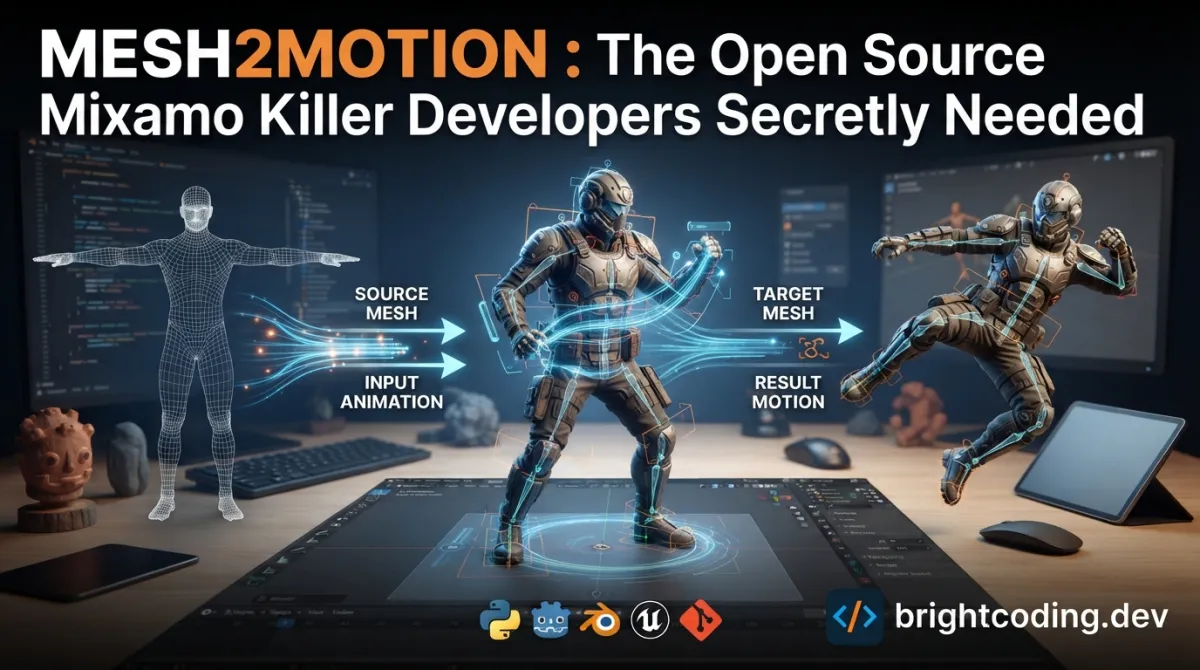
Now imagine a different reality. A web app where you drop your GLB model, pick a skeleton type, tweak it to fit, and boom—your character is running, jumping, attacking with professional animations. No subscription fees. No vendor lock-in. No begging Adobe to support your obscure rig. That's Mesh2Motion, and it's about to change how you think about 3D character animation forever.
Built by a passionate solo developer burning midnight oil, this isn't just another tool—it's a declaration of independence for creators who believe their workflows shouldn't be held hostage by closed ecosystems. The open-source revolution has finally reached character animation, and you're early enough to ride the wave.
What is Mesh2Motion?
Mesh2Motion is an open-source web application that automatically assigns and exports animations for 3D models. Created by an independent developer frustrated with the limitations of existing solutions, it represents a growing movement toward democratized 3D animation tools.
The project lives at github.com/Mesh2Motion/mesh2motion-app and offers a live deployment at app.mesh2motion.org for immediate testing. Think of it as what Mixamo could have become if it prioritized flexibility and community ownership over corporate control.
Here's why it's trending right now:
- The Mixamo Exodus: Adobe's acquisition and subsequent stagnation of Mixamo left developers hungry for alternatives that actually evolve
- GLB/GLTF Standard Dominance: As these formats become the "JPEG of 3D," tools that natively support them gain massive utility
- Self-Hosting Renaissance: Developers increasingly refuse dependency on SaaS platforms that might disappear or change pricing overnight
- Indie Game Dev Boom: The explosion of solo and small-team creators needs tools that scale from hobby to commercial without artificial barriers
The creator explicitly designed Mesh2Motion with expandability as a core philosophy. Unlike closed tools that dictate supported formats and skeleton types, this project's open architecture invites contribution. The MIT-licensed code and CC0 art assets remove every legal friction point that typically slows adoption.
The marketing site at mesh2motion.org tracks features and release notes, while a separate mesh2motion-assets repository houses Blender source files to keep the main codebase lean.
Key Features That Separate Mesh2Motion From the Pack
Let's dissect what makes this tool genuinely powerful under the hood:
Native GLB/GLTF-First Architecture
No conversion layers. No deprecated FBX pipelines. Mesh2Motion speaks the modern language of 3D directly. GL Transmission Format (glTF) is the runtime asset format of choice for WebGL, Three.js, Babylon.js, Unity, Unreal Engine 5, and Godot 4. By building natively on this standard, Mesh2Motion eliminates an entire class of import/export bugs that plague older workflows.
Flexible Skeleton System
The "pick your skeleton type" approach is deceptively simple and profoundly powerful. Instead of forcing your model into a predefined rig, you select from available skeleton templates and modify placement to fit your specific topology. This means:
- Non-humanoid characters aren't second-class citizens
- Custom proportions (stylized chibis, towering mechs, quadrupeds) get proper treatment
- Future skeleton types can be added by the community without core codebase changes
Real-Time Preview Pipeline
Test animations before committing to export. This iterative loop—import → rig → test → adjust → export—mirrors professional animation workflows but compresses them into minutes instead of hours.
Production-Ready Export
What you preview is what you get. The exported GLB maintains clean skinning data, proper bone hierarchies, and animation curves ready for engine ingestion.
Containerized Deployment
The Docker↗ Bright Coding Blog setup means you can run this on your laptop, your studio server, or a cloud instance with identical behavior. For teams handling sensitive IP, this is non-negotiable.
Preview Video Generation
A separate internal tool generates marketing-ready video previews of each animation. While primarily for the project's own asset library, this hints at future extensibility for automated content pipelines.
Real-World Use Cases Where Mesh2Motion Dominates
1. Rapid Indie Game Prototyping
You're building a soulslike in Godot. You need twenty enemy variants with distinct silhouettes but shared animation sets. Mesh2Motion lets you batch-process character models through a consistent skeleton, getting you to gameplay testing in hours instead of weeks.
2. Web-Based 3D Configurators
E-commerce clients demand customizable avatars that dance, gesture, or demonstrate products. Self-hosting Mesh2Motion means your animation pipeline lives alongside your Next.js↗ Bright Coding Blog or Nuxt application—no external API dependencies that could break your conversion funnel.
3. AI-Generated Character Workflows
The explosion of text-to-3D tools (Meshy, Rodin, Tripo) outputs raw geometry without rigging. Mesh2Motion bridges the critical gap: take that AI-generated mesh, auto-rig it, and have it animated same-day. This is the missing link in generative 3D pipelines.
4. Educational Animation Labs
Universities teaching real-time graphics need tools students can inspect, modify, and deploy without licensing headaches. MIT licensing plus readable TypeScript codebase makes this ideal for curriculum integration.
5. Custom Engine Development
Building your own engine or framework? Mesh2Motion's open implementation reveals how modern web-based retargeting works. Study the source, adapt the algorithms, accelerate your own tooling.
Step-by-Step Installation & Setup Guide
Ready to run your own instance? Here's the complete path from zero to animated character.
Prerequisites
- Node.js 24 (other versions likely work, but 24 is verified)
- npm (comes with Node)
- Optional: Docker + Docker Compose for containerized deployment
Standard Local Development
Open your terminal and navigate to the repository directory:
# Clone the repository
git clone https://github.com/Mesh2Motion/mesh2motion-app.git
cd mesh2motion-app

# Install all dependencies
npm install

# Start the development server with hot reload
npm run dev
The Vite-powered dev server spins up, typically on http://localhost:5173. Open that URL and you're staring at the Mesh2Motion interface.
Production Build
Since this is TypeScript-heavy and browsers can't execute .ts directly, we need Vite's build step:
# Create optimized production bundle in `dist/` folder
npm run build
The dist/ directory contains static files ready for any web server (nginx, Apache, Vercel, Netlify, S3). Check vite.config.js for build customization options.
Docker Deployment (Recommended for Teams)
Prefer isolation from your host system? The included Docker setup handles everything:
# Ensure Docker daemon is running first!
docker-compose up -d
The -d flag detaches the container to run in background. Access your instance at:
http://localhost:3000
Why Docker matters for production: Identical environments across developer machines, CI/CD pipelines, and deployment targets. No "works on my machine" debugging sessions.
Verifying Your Installation
Once running, test with the built-in workflow:
- Locate any
.glbor.gltfmodel (Sketchfab has free CC0 options) - Drag into the import zone
- Select a skeleton template
- Adjust bone positions to match your model's joints
- Click test animations
- Export and inspect in gltf.report or your engine of choice
REAL Code Examples From the Repository
Let's examine actual implementation patterns from the Mesh2Motion codebase and documentation.
Example 1: Core Build Commands
The README specifies these exact commands for project lifecycle management:
# Development server with Vite hot module replacement
npm run dev

# Production build generating static deployable assets
npm run build

# Docker Compose orchestration for containerized deployment
docker-compose up -d
What's happening here? npm run dev leverages Vite's native ESM-based dev server, providing instant feedback loops without full rebuilds. The build command triggers tsc compilation plus Vite's Rollup-based bundling, tree-shaking unused code, and generating optimized chunks. The Docker command references a docker-compose.yml (implied by standard conventions) that likely binds port 3000 and mounts volumes for development persistence.
Example 2: Project Structure Insight
While not explicitly code, the repository organization reveals architectural decisions:
mesh2motion-app/
├── src/
│   ├── preview-generator/    # Video preview tool (separate README)
│   │   └── README.md         # Internal documentation
│   └── [core application]    # Main web app source
├── mesh2motion.svg           # Project branding
├── readme.png                # Screenshot asset
├── vite.config.js            # Build tool configuration
├── Dockerfile                # Container definition
├── docker-compose.yml        # Orchestration (implied)
└── package.json              # Node dependencies
Key insight: The separation of preview-generator into its own documented subfolder demonstrates mature project hygiene. This isn't a monolithic mess—it's structured for contributor onboarding. The Vite configuration file is explicitly called out as the place to customize build behavior, suggesting the maintainer expects power users to tune output for their specific deployment targets.
Example 3: Asset Pipeline Workflow
The README describes the Blender-to-GLB pipeline that feeds the application:
Blender Source Files (mesh2motion-assets repo)
    ↓
Export/Compress to GLB
    ↓
Commit to mesh2motion-app (this repo)
    ↓
Runtime loading in web application
Implementation implication: This two-repo strategy prevents git bloat from large binary files while maintaining clean version history for code. For contributors adding animations: work in the mesh2motion-assets repository, export optimized GLBs, then submit those compressed files to the main app repository. The .gitignore in the main repo likely excludes .blend files to enforce this separation.
Example 4: Implicit WebGL/Three.js Patterns
Though not shown in raw code, the GLB-first approach and web deployment strongly indicate Three.js or Babylon.js usage. A typical animation loading pattern in such architectures would resemble:
// Conceptual pattern based on technology stack indicators
import { GLTFLoader } from 'three/examples/jsm/loaders/GLTFLoader.js';

const loader = new GLTFLoader();

// Load user-imported model with automatic skinning
loader.load('user-model.glb', (gltf) => {
  const model = gltf.scene;

  // Skeleton retargeting happens here internally
  // Mesh2Motion's core value: automating this complex step
  const skeleton = extractOrGenerateSkeleton(model);

  // Apply selected animation clips from library
  const mixer = new THREE.AnimationMixer(model);
  const action = mixer.clipAction(gltf.animations[0]);
  action.play();

  scene.add(model);
});
Why this matters: The manual Three.js approach requires deep knowledge of SkinnedMesh, Bone hierarchies, and AnimationClip binding. Mesh2Motion abstracts this entire complexity into visual, interactive steps.
Advanced Usage & Best Practices
Optimize Your Source Models Before Import
Clean topology with proper edge flow at joints prevents automatic weighting artifacts. Remove unnecessary micro-geometry that confuses skeleton fitting algorithms.
Skeleton Template Selection Strategy
Start with the closest match, then use the modification tools rather than forcing an ill-fitting template. The "test results" button between adjustments saves export-debug-reimport cycles.
Batch Processing via API
While the web UI is primary, inspect the TypeScript source for potential programmatic access. The build system and architecture suggest clean separation between UI and core logic—ripe for scripting.
Asset Library Expansion
Contribute to mesh2motion-assets if you create original animations. The CC0 licensing means your work becomes universally reusable, building your reputation in the open 3D ecosystem.
Performance Monitoring
Large animation libraries in browser contexts demand attention to texture memory and draw calls. The preview generator can help identify which animations stress your target platform.
Comparison With Alternatives
| Feature | Mesh2Motion | Mixamo | Blender + Auto-Rig Pro | Unreal Engine Control Rig |
|---|---|---|---|---|
| Cost | Free (MIT) | Free with Adobe account | $40 (addon) | Free (5% royalty) |
| Open Source | ✅ Yes | ❌ No | ❌ No | ❌ Partial |
| Self-Hostable | ✅ Yes | ❌ No | N/A (desktop) | N/A (desktop) |
| Web-Based | ✅ Yes | ✅ Yes | ❌ No | ❌ No |
| Custom Skeletons | ✅ Flexible | ❌ Limited presets | ✅ Yes | ✅ Yes |
| GLB Native | ✅ Yes | ⚠️ Export only | ⚠️ Via addon | ⚠️ Via export |
| Community Extensible | ✅ Yes | ❌ No | ❌ No | ⚠️ Limited |
| Learning Curve | Low | Low | High | Very High |
| Offline Capable | ✅ With Docker | ❌ No | ✅ Yes | ✅ Yes |
The verdict? Mesh2Motion occupies a unique position: easier than full DCC tools, more flexible than closed web services, and future-proof through open governance. For teams building web-first 3D experiences or requiring deployment control, alternatives simply don't compete.
Frequently Asked Questions
What file formats does Mesh2Motion support?
Currently GLB and GLTF for both import and export. This aligns with modern 3D web standards. Additional formats may come through community contribution.
Can I use Mesh2Motion commercially?
Absolutely. The MIT license permits any use including commercial products, with no attribution requirement (though it's appreciated). The CC0 animation assets are equally unrestricted.
How does skeleton fitting work for non-humanoid characters?
The skeleton modification tools let you reposition, scale, and potentially restructure bone chains to match your model's topology. The system is explicitly designed for flexibility beyond standard humanoids.
Is there an API for batch processing?
The web UI is currently the primary interface. However, the TypeScript codebase is inspectable and potentially scriptable. Watch the repository for API developments or contribute one yourself.
What's the performance like for complex models?
Browser-based WebGL performance depends on your GPU and model complexity. The preview system lets you verify behavior before export. For production, optimize geometry and texture resolution.
How can I contribute animations?
Fork the mesh2motion-assets repository, create original work in Blender, export optimized GLBs, and submit pull requests. The project maintainer may fund professional animator contributions through community support.
Will Mesh2Motion replace my entire animation pipeline?
For many indie and web projects: yes. For AAA film production with extreme custom demands, it may serve as rapid prototyping before hand-crafted refinement. Evaluate against your specific quality and control requirements.
Conclusion: The Future of 3D Animation is Open
Mesh2Motion arrives at a pivotal moment. The 3D industry is fragmenting from monolithic suites toward composable, specialized tools. Game engines are free. Generative modeling is accelerating. The remaining friction point—getting characters to move believably—is exactly what this project attacks.
The solo developer behind github.com/Mesh2Motion/mesh2motion-app has made a bold bet: that community-driven tooling can out-evolve corporate alternatives when built on open standards and genuine user needs. The MIT license isn't just legal text—it's an invitation to ownership. Your contributions today shape the tool's trajectory tomorrow.
Stop accepting animation pipelines that treat you as a tenant rather than an owner. Fork the repo. Try the live demo. Break things. Fix things. Share what you build. The next time you're staring at an unrigged model at 2 AM, you'll have something better than hope—you'll have Mesh2Motion.
👉 Star the repository now: github.com/Mesh2Motion/mesh2motion-app
👉 Try it instantly: app.mesh2motion.org
👉 Support development: support.mesh2motion.org
The animation revolution won't be centralized. It will be forked, starred, and merged by developers like you.
Outils recommandés
Explore on the BrightCoding network
Hand-picked resources from our other sites.
Invoice Collector: The Essential Docker Tool for Automation
Invoice Collector is a free Docker container that automates invoice retrieval from portals, APIs, and emails. This comprehensive guide covers installation, real...
Stop Wrestling with CSS in Next.js! Once UI Core Changes Everything
Discover Once UI Core, the indie design system built exclusively for Next.js apps. Learn installation, real code examples, and why developers are switching from...
Terrae: Stop Writing Mapbox Layers, Use Props Instead
Terrae transforms Mapbox development with composable React components that replace imperative layers with simple props. Built for shadcn/ui compatibility with b...
Continuez votre lecture
Robin: The Revolutionary AI Tool for Dark Web Investigations

Robin: The Revolutionary AI OSINT Tool for Dark Web Investigations
Rdio Scanner: The Revolutionary SDR Audio Distribution System

Stop Coding Alone: OPC-Skills Gives Your AI Agent Superpowers
Commentaires 0
Aucun commentaire pour l'instant. Soyez le premier à réagir !