rigvedmaanas/CustomTkinterBuilder: A Free RAD Tool for CustomTkinter UIs
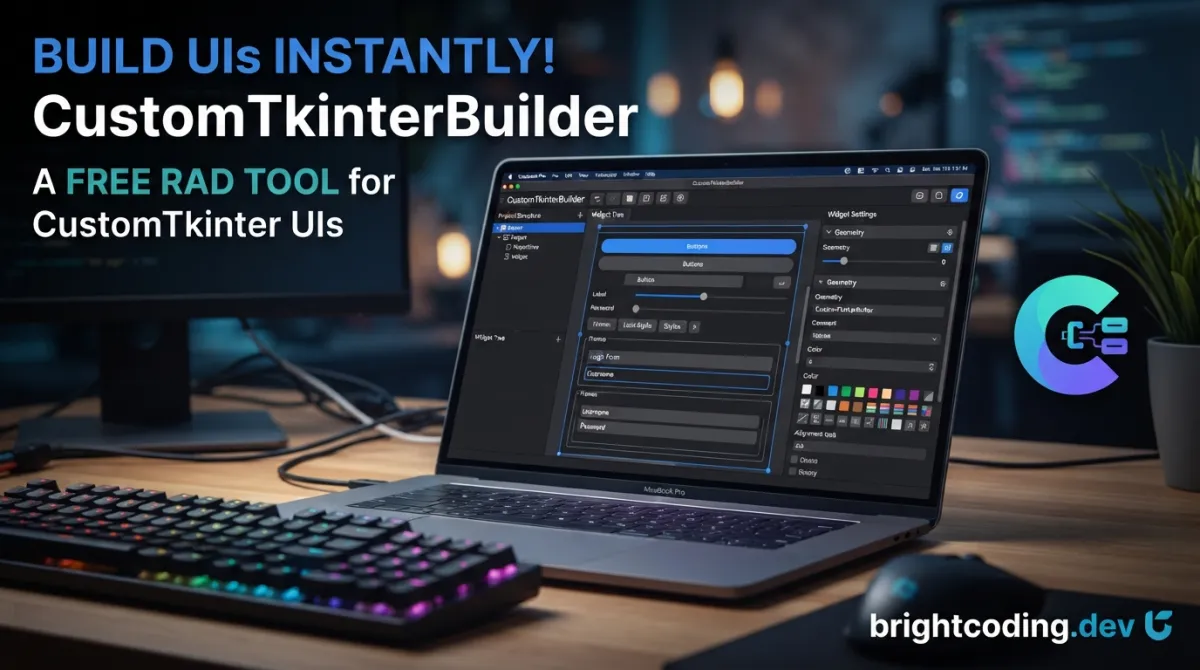
rigvedmaanas/CustomTkinterBuilder: A Free RAD Tool for CustomTkinter UIs
Building modern Python↗ Bright Coding Blog desktop applications with CustomTkinter typically means hand-coding every widget, managing layout parameters, and iterating through countless save-run-check cycles. For developers who prefer visual design workflows, the ecosystem has historically lacked free, open-source alternatives to paid tools like CTkDesigner. rigvedmaanas/CustomTkinterBuilder addresses this gap directly: it is a drag-and-drop rapid application development (RAD) tool that generates CustomTkinter code without requiring manual widget placement or repetitive boilerplate.
This article examines what CustomTkinterBuilder offers, how to install and use it, and where it fits in the broader landscape of Python UI builders. Whether you are prototyping a utility app or building a production interface, understanding this tool's capabilities—and its current maintenance status—will help you decide if it belongs in your workflow.
What is rigvedmaanas/CustomTkinterBuilder?
CustomTkinterBuilder is a free, open-source RAD tool developed by rigvedmaanas for creating user interfaces with the CustomTkinter library. The project is licensed under the GNU General Public License v3.0 and is implemented in Python. As of the last commit on 2026-04-30, the repository has accumulated 362 stars and 24 forks on GitHub.
The tool provides a visual design environment where developers can construct complex UIs through direct manipulation—dragging widgets onto a canvas, adjusting properties through panels, and exporting the result to functional Python code. This approach mirrors traditional GUI builders found in ecosystems like Qt Designer or Visual Studio, but targets the specific widget set and theming system of CustomTkinter.
Notably, the maintainer has announced that the project will no longer receive updates. The decision stems from multiple factors: the codebase's complexity (originally written when the author was approximately 15 years old), inherent performance limitations in CustomTkinter's CPU-based canvas rendering, the emergence of promising alternatives like CTkMaker, and the author's focus on college entrance exam preparation. Despite this dormancy, the existing release remains functional and may serve specific use cases where a free, open-source CustomTkinter builder is required.
Key Features
CustomTkinterBuilder's feature set centers on accelerating UI development through visual abstraction while preserving access to CustomTkinter's full widget capabilities.
Drag-and-Drop Interface Design: The core workflow allows placing widgets visually rather than through coordinate or grid calculations. This reduces the cognitive overhead of layout management during initial prototyping.
Comprehensive Parameter Control: All widget properties are adjustable through the interface—not just basic attributes like text and color, but the full parameter set exposed by each CustomTkinter widget.
Layout Manager Support: The builder currently supports the Pack geometry manager with responsive behavior. Support for Place and Grid managers was planned but not implemented before development ceased.
Widget Coverage: The tool includes 15–16 core CustomTkinter widgets and 10 pre-customized variants, covering common interface elements from basic labels and buttons to scrollable frames and segmented controls.
Asset Integration: Built-in support for over 2,000 icons across five styles with customizable colors eliminates external icon management. Users can also add custom images and configure fonts.
Theme System: The Palette feature enables one-click color scheme changes across an entire UI, supporting both light and dark mode development. This is particularly valuable for applications requiring theme switching without manual color constant updates.
Project Persistence: Designs can be saved as .json project files and exported to .py files in either standard or object-oriented programming (OOP) structure. The hierarchy panel provides visual navigation of widget nesting relationships.
Productivity Operations: Standard IDE-like operations are supported: widget duplication, deletion, reordering, and parent reassignment. Scrollable frame support covers both vertical and horizontal orientations.
Use Cases
Rapid Prototyping for Internal Tools: Development teams building admin dashboards, configuration utilities, or data entry forms can use CustomTkinterBuilder to generate initial layouts quickly. The JSON project format allows version-controlled iteration before finalizing exported Python code.
Educational Contexts: Python instructors teaching GUI development can leverage the visual builder to demonstrate CustomTkinter widget relationships without students getting lost in geometry manager syntax. The exported OOP code serves as a bridge to production patterns.
Theme-Consistent Application Suites: Organizations standardizing on CustomTkinter's aesthetic can use the Palette system to enforce color schemes across multiple applications, then export consistently styled codebases.
Legacy CustomTkinter Maintenance: Teams with existing CustomTkinter codebases who need to extend or redesign interfaces without rewriting layout code from scratch may find the import-export workflow valuable, though direct code import is not documented.
Low-Resource Development Environments: Unlike web-based or electron-based alternatives, CustomTkinterBuilder runs natively in Python with tkinter, making it viable for constrained environments where heavier frameworks are impractical.
Installation & Setup
CustomTkinterBuilder can be installed through pip or downloaded directly from GitHub releases.
Pip Installation (Recommended)
# Install from PyPI
pip install CustomTkinterBuilder

# Launch the application
customtkinterbuilder
The pip distribution handles dependencies automatically. User settings are stored in the OS user config directory and persist across version updates.
Update Existing Installation
# Update to latest available version
customtkinterbuilder --update
Direct Download
For users preferring standalone distribution or working in air-gapped environments, the v1.0.0 release is available from the GitHub releases page.
System Requirements
While not explicitly documented, CustomTkinterBuilder inherits CustomTkinter's requirements: Python 3.7+ with tkinter support. The CPU-based rendering of CustomTkinter means performance scales with processor capability rather than GPU acceleration—something to consider for complex UIs on lower-end hardware.
Real Code Examples
The README does not contain extensive inline code samples; the following examples reflect the documented export capabilities and installation commands.
Basic Installation and Launch
# Standard pip installation pathway
pip install CustomTkinterBuilder

# Execute the builder
customtkinterbuilder
This represents the primary entry point. The customtkinterbuilder command initializes the graphical environment where all subsequent design work occurs.
Update Workflow
# Check for and apply updates
customtkinterbuilder --update
The update flag queries PyPI for newer versions and applies them while preserving user configuration data stored in the OS-standard config directory.
Exported Code Structure
While the README does not display sample exported Python, it documents two export modes:
- Standard: Procedural Python code with widget instantiation and layout calls
- OOP: Class-based structure encapsulating the UI as reusable components
The exported code utilizes the Pack geometry manager for layout, as this is the currently supported manager within the builder interface. Developers requiring Grid or Place management must modify exported code manually or consider alternatives.
Advanced Usage & Best Practices
Given the project's dormant status, several considerations apply for effective use.
Version Pinning: Since updates are discontinued, pin CustomTkinterBuilder==1.0.0 in requirements files to ensure reproducible environments. Monitor CustomTkinter itself for breaking changes that might affect generated code compatibility.
Export Review: Always review exported Python before integration. The builder abstracts layout details that may need optimization for production—particularly Pack configuration that could be more efficiently expressed in Grid for complex arrangements.
Palette as Design System: Define organizational color palettes early using the built-in system. Export these configurations alongside projects to maintain consistency when hand-modifying generated code.
Icon Asset Management: The 2,000+ built-in icons reduce dependency management, but verify licensing compatibility for your specific use case. Custom images should follow standard Python path resolution practices.
Performance Awareness: CustomTkinter's CPU-based canvas rendering becomes noticeable with complex UIs. The builder itself does not optimize for this; consider widget count and nesting depth when designing for lower-spec target hardware.
Comparison with Alternatives
| Tool | Cost | Open Source | CustomTkinter Specific | Maintenance Status | Key Differentiator |
|---|---|---|---|---|---|
| CustomTkinterBuilder | Free | Yes (GPL v3) | Yes | Dormant | Built-in icon library, palette system |
| CTkDesigner | Paid | No | Yes | Active (commercial) | Professional support, advanced features |
| CTkMaker | Free | Yes | Yes | Active | Modern codebase, rapid development |
| Flet | Free | Yes | No | Active | Native performance, web/mobile targets |
| PyQt5/PySide | Free/LGPL or Commercial | Yes (partial) | No | Active | Mature ecosystem, comprehensive widgets |
CustomTkinterBuilder occupies a specific niche: free, open-source, and purpose-built for CustomTkinter. Its dormancy is the critical trade-off against actively maintained alternatives. CTkMaker represents the most direct successor in spirit, having achieved comparable functionality rapidly through modern development practices. For projects where CustomTkinter itself is not a hard requirement, Flet or PyQt5 offer superior performance characteristics at the cost of learning curve and ecosystem migration.
FAQ
Q: Is CustomTkinterBuilder still maintained? A: No. The maintainer explicitly announced discontinuation due to codebase complexity, CustomTkinter limitations, and personal time constraints.
Q: What Python versions are supported? A: Not explicitly documented; CustomTkinter itself requires Python 3.7+.
Q: Can I use Grid or Place layout managers? A: Not within the builder. Only Pack is supported. Grid and Place were planned but never implemented.
Q: Is the generated code GPL-licensed? A: No. The tool is GPL v3, but generated project files and exported code belong to the user.
Q: How does performance compare to hand-coded CustomTkinter? A: Generated code should be equivalent; CustomTkinter's inherent CPU-based rendering limitations apply regardless of generation method.
Q: Can I import existing CustomTkinter code? A: Not documented. The workflow is builder-first, export-to-code.
Q: What alternatives should I evaluate? A: Consider CTkMaker for active CustomTkinter-specific development, or Flet/PyQt5 for broader performance needs.
Conclusion
rigvedmaanas/CustomTkinterBuilder delivers on its core promise: a free, open-source visual builder for CustomTkinter interfaces with genuine productivity features including drag-and-drop design, comprehensive widget support, and useful amenities like built-in icons and theme palettes. Its 362 GitHub stars reflect real developer interest in this problem space.
However, prospective users must weigh its dormant maintenance status against their project timelines. For immediate needs with CustomTkinter specifically, it remains functional and installable via pip. For longer-term investments, evaluating CTkMaker or migrating to higher-performance frameworks may prove more sustainable.
The tool stands as a noteworthy contribution from a young developer—one that identified and partially filled a genuine gap in the Python GUI ecosystem. Download it from the GitHub releases page, install via pip install CustomTkinterBuilder, or explore the source repository to assess fit for your specific use case.
For broader Python GUI development strategies, see our coverage of [INTERNAL_LINK: modern-python-desktop-frameworks].
Explore on the BrightCoding network
Hand-picked resources from our other sites.
IAmTomShaw/f1-race-replay: Interactive F1 Telemetry Visualization in Python
IAmTomShaw/f1-race-replay is a Python application for interactive Formula 1 race visualization and telemetry analysis, built with FastF1 and Arcade. Features in...
GiovanniPasq/agentic-rag-for-dummies: Build Agentic RAG with LangGraph
Modular Agentic RAG system built with LangGraph featuring hierarchical indexing, conversation memory, multi-agent map-reduce, and human-in-the-loop query clarif...
XD-MHLOO/Osintgraph: Map Instagram Networks with Neo4j and AI
XD-MHLOO/Osintgraph is a Python CLI tool that collects public Instagram data and maps social networks in Neo4j, with AI-powered analysis via Google's Gemini API...
Continuez votre lecture
Why Alexandrie is the Ultimate Markdown Note-Taking App

Why CrossPaste is the Ultimate Game Changer for Clipboard Management
Why Chandra is the Ultimate OCR Tool for Handwriting and Tables

Stop Coding Alone: OPC-Skills Gives Your AI Agent Superpowers
Commentaires 0
Aucun commentaire pour l'instant. Soyez le premier à réagir !