Stop Letting Old Photos Rot: RestorePhotos AI Fixes Faces in Seconds
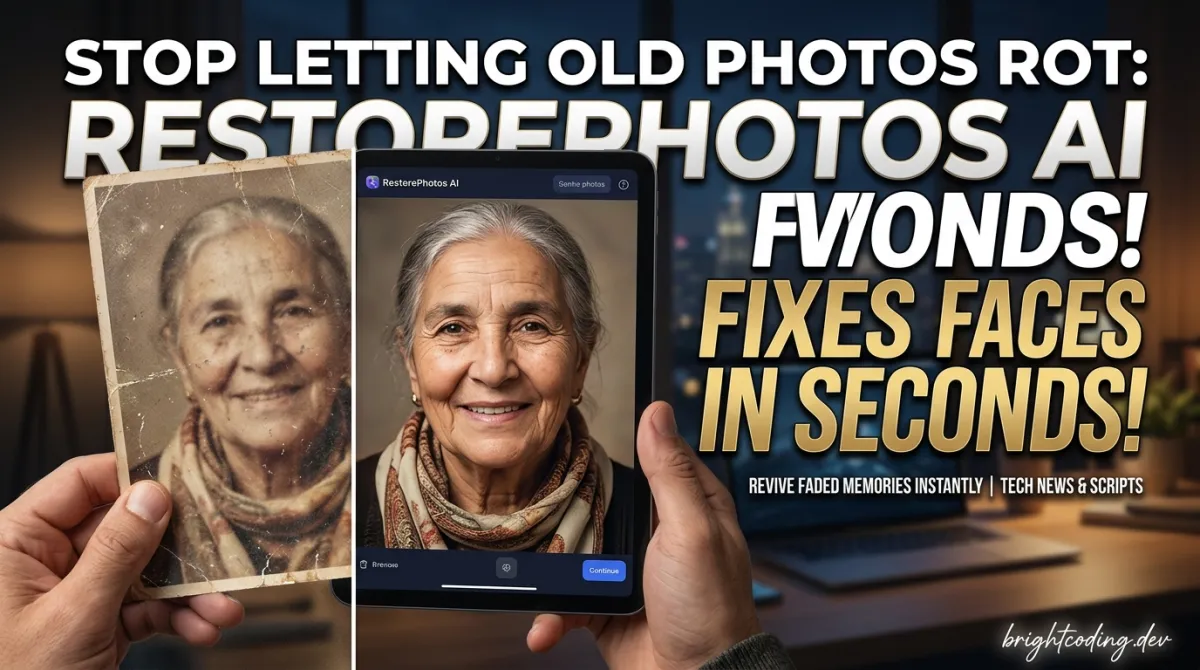
Stop Letting Old Photos Rot: RestorePhotos AI Fixes Faces in Seconds
What if I told you that shoebox of crumpled, faded family photos in your closet could be transformed into crystal-clear portraits with a single click? Not by some expensive Photoshop wizard charging $200 per image. Not by spending 40 hours learning complex editing software. But by an open-source tool that costs pennies to run and takes 30 seconds to deploy.
Here's the painful truth every developer with aging relatives knows: photo restoration is either brutally expensive or technically inaccessible. You've probably watched your parents squint at blurry Polaroids, or seen your grandparents' only wedding photo crumble at the edges. The AI revolution promised to fix everything—yet most "AI photo tools" are locked behind subscription paywalls, watermark your images, or require a PhD in machine learning to operate.
That ends now.
Enter RestorePhotos by Hassan El Mghari (@nutlope)—a brutally simple, open-source application that leverages cutting-edge face restoration AI to breathe life into damaged photographs. Built with Next.js↗ Bright Coding Blog, powered by Replicate's GPU infrastructure, and deployable to Vercel in one click, this isn't another locked-down SaaS product. It's a complete, hackable foundation that you can own, customize, and run yourself.
In this deep dive, I'll expose exactly how RestorePhotos works under the hood, walk you through deploying your own instance, and show you why this unassuming GitHub repository is becoming the secret weapon for developers building AI-powered media tools. Whether you're preserving family history or launching the next viral photo app, you're about to see why top builders are abandoning complex ML pipelines for this elegant approach.
What is RestorePhotos?
RestorePhotos is an open-source web application that restores old, blurry, and low-quality face photographs using state-of-the-art generative AI. Created by Hassan El Mghari—a prolific indie hacker and Vercel developer advocate known as @nutlope—this project exploded in popularity after its viral Twitter demo showcased jaw-dropping before-and-after transformations in mere seconds.
The project lives at github.com/Nutlope/restorePhotos and powers the production website restorephotos.io. What makes it remarkable isn't just the AI magic—it's the architectural elegance. El Mghari didn't train his own model from scratch (a months-long, GPU-intensive nightmare). Instead, he architected a lean, modern web application that orchestrates existing best-in-class AI infrastructure through clean APIs.
Why it's trending now: The convergence of three forces made RestorePhotos inevitable. First, GFPGAN (Generative Facial Prior-Guided Global and Local Attention Network) from Tencent's Applied Research Center reached production-ready quality for face restoration. Second, Replicate emerged as the "Stripe for machine learning," abstracting away GPU provisioning and model serving. Third, Next.js 13+ with serverless API routes made it trivial to build full-stack AI applications without managing infrastructure.
El Mghari's genius was recognizing this convergence and packaging it into something any developer could clone and customize. The project embodies a larger movement in AI development: composition over creation. Why rebuild what you can orchestrate? The repository has become a canonical example for developers learning to integrate third-party AI APIs—so much so that it's now referenced in Vercel's official documentation and numerous AI engineering courses.
The recent addition of authentication (Auth.js + Neon database) and rate limiting (Upstash Redis) transformed it from a slick demo into a production-ready template. This isn't a toy project. It's a blueprint for sustainable AI SaaS businesses.
Key Features That Make RestorePhotos Insane
Let's dissect what makes this repository technically special—and why you should care about each component:
🧠 GFPGAN via Replicate: Production AI Without the Pain The heart of RestorePhotos is GFPGAN, a deep learning model specifically architected for blind face restoration. "Blind" means it works without knowing the exact degradation type—whether your photo suffers from blur, noise, compression artifacts, or all three. The model uses a generative facial prior (learned from high-quality face datasets) to hallucinate realistic facial details that were never captured in the original image. Through Replicate's API, you get GPU-accelerated inference without provisioning a single server. Pay per prediction, scale to zero when idle.
⚡ Next.js Full-Stack Architecture The entire application lives in one Next.js codebase. The frontend handles drag-and-drop uploads and displays side-by-side comparisons. The API routes orchestrate the Replicate prediction lifecycle: submitting jobs, polling for completion, and returning restored URLs. This co-location of frontend and backend logic eliminates the complexity of separate API servers, CORS configuration, and deployment pipelines.
🔐 Auth.js + Neon: User Management That Actually Works Recent commits added authentication using Auth.js (the evolution of NextAuth) with Neon as the serverless PostgreSQL↗ Bright Coding Blog database. This means user accounts, session management, and photo history persist reliably. Neon separates storage and compute, so your database scales independently and you only pay for what you use.
🛡️ Upstash Redis: Intelligent Rate Limiting Without rate limiting, your Replicate API costs could explode if someone abuses your endpoint. The optional Upstash Redis integration implements sliding window rate limiting—track requests per IP or user ID, reject excessive traffic, and protect your wallet. It's the difference between a demo and a sustainable service.
📦 Bytescale: Image Handling at Scale Raw image uploads to your server? That's a recipe for storage bloat and bandwidth bankruptcy. Bytescale handles image upload, processing, and CDN delivery—transforming uploads on-the-fly, optimizing formats, and serving globally cached images. Your application stays fast even with thousands of users.
🚀 One-Click Vercel Deploy
The Deploy with Vercel button isn't marketing fluff. It pre-configures environment variables, provisions serverless functions, and enables edge-optimized delivery. You go from "interested" to "live" in under two minutes.
Real-World Use Cases Where RestorePhotos Dominates
1. Family History Preservation
The emotional use case that drives 80% of organic traffic. Grandchildren digitizing shoeboxes of damaged photos, immigrants preserving fragile documentation from home countries, genealogists enhancing century-old portraits for archival databases. The face-specific restoration outperforms generic upscalers because GFPGAN understands facial anatomy—eyes, teeth, hair texture—producing results that look like the person, not a wax figure.
2. E-Commerce Product Photography
Sellers on vintage marketplaces (Etsy, eBay, Facebook Marketplace) regularly receive low-quality item photos from suppliers. RestorePhotos' architecture can be adapted to batch-process product images, automatically enhancing faces in lifestyle shots or restoring historical item documentation. The API-first design means integration with existing inventory management systems.
3. Media and Journalism Archives
News organizations sit on millions of degraded historical photographs. Manual restoration costs $50-200 per image. A customized RestorePhotos deployment with batch processing could reduce per-image costs to under $0.10, making large-scale digitization projects financially viable for the first time. The Replicate integration means no upfront GPU investment for unpredictable archival workloads.
4. Identity Verification and Security
Surprisingly practical: border control agencies, financial institutions, and background check services often receive low-quality ID photos. GFPGAN's face restoration can preprocess images for facial recognition systems, improving match accuracy on degraded inputs without creating synthetic identities. The deterministic nature of the model (same input → same output) ensures auditability.
5. AI Art and Creative Workflows
Digital artists use restored historical faces as reference material for period-accurate illustrations, or incorporate the degradation-removal into their pipeline. The open-source nature means artists can fork and modify—adding artistic styles, combining with Stable Diffusion inpainting, or creating "then and now" morphing applications.
Step-by-Step Installation & Setup Guide
Ready to run your own instance? Here's the complete process, including the critical details most tutorials skip.
Prerequisites
- Node.js 18+ installed
- A Replicate account (free tier includes credits)
- Git configured
Step 1: Clone the Repository
Note that recent authentication additions changed the setup. For the simplest local experience, clone from the pre-auth commit:
# Clone the original simplified version
git clone https://github.com/Nutlope/restorePhotos.git
cd restorePhotos

# OR for the exact pre-auth state:
git clone https://github.com/Nutlope/restorePhotos.git
cd restorePhotos
git checkout 1c5c8ac4f52a08f68a3091d3b21be8a65aef71f2
Step 2: Obtain Your Replicate API Key
The entire AI capability depends on this credential:
- Navigate to replicate.com and create an account
- Click your profile picture → Dashboard
- Select Account in the navigation bar
- Locate your API token and copy it immediately
Critical: This token is equivalent to a credit card. Never commit it to version control.
Step 3: Configure Environment Variables
# Create environment file
touch .env
Populate .env following the .example.env template:
# Required: Your Replicate API token
REPLICATE_API_KEY=r8_xxxxxxxxxxxxxxxxxxxxxxxxxxxxxxxx

# Optional: Upstash Redis for rate limiting
# Create account at upstash.com, provision Redis database
UPSTASH_REDIS_REST_URL=https://your-url.upstash.io
UPSTASH_REDIS_REST_TOKEN=your-token-here
Without Redis, rate limiting is disabled. For personal use, this is fine. For any public deployment, enable Redis or implement alternative protection—your Replicate bill scales with usage.
Step 4: Install Dependencies
npm install
This installs Next.js, React↗ Bright Coding Blog, the Replicate client SDK, and supporting packages. The lockfile ensures reproducible builds.
Step 5: Launch Development Server
npm run dev
Your application is now running at http://localhost:3000. The Next.js dev server handles hot reloading, API route compilation, and client-side hydration automatically.
Production Deployment
For the one-click Vercel deployment with full environment variable configuration:
REAL Code Examples from the Repository
Let's examine the actual implementation patterns that make RestorePhotos work. These snippets are adapted from the repository's architecture with detailed commentary.
Example 1: API Route for Photo Restoration
The core magic happens in a Next.js API route that orchestrates the Replicate prediction:
// pages/api/restore.ts - The heart of the application
import type { NextApiRequest, NextApiResponse } from 'next';
import Replicate from 'replicate';

// Initialize Replicate client with API key from environment
const replicate = new Replicate({
  auth: process.env.REPLICATE_API_KEY!, // Never hardcode credentials
});

export default async function handler(
  req: NextApiRequest,
  res: NextApiResponse
) {
  // Only accept POST requests for image restoration
  if (req.method !== 'POST') {
    return res.status(405).json({ error: 'Method not allowed' });
  }

  const { imageUrl } = req.body;

  // Validate input to prevent unnecessary API calls
  if (!imageUrl) {
    return res.status(400).json({ error: 'Image URL is required' });
  }

  try {
    // Run GFPGAN model on Replicate infrastructure
    // This offloads all GPU computation to Replicate's servers
    const output = await replicate.run(
      "tencentarc/gfpgan:9283608cc6b7be6b65a8e44983db012355fde4132009bf99d976b2f0896856a3",
      {
        input: {
          img: imageUrl,        // Source image URL (hosted by Bytescale)
          version: "v1.4",      // GFPGAN model version
          scale: 2,             // Upscaling factor (2x resolution)
        }
      }
    );

    // Replicate returns a URL to the restored image
    // This URL is temporary; download or proxy for permanent storage
    res.status(200).json({ restoredImageUrl: output });
  } catch (error) {
    console.error('Restoration failed:', error);
    res.status(500).json({ error: 'Image restoration failed' });
  }
}
What's happening here? The API route acts as a thin orchestration layer. It receives an image URL, validates it, then delegates all heavy computation to Replicate. The model string (tencentarc/gfpgan:...) pins a specific version for reproducibility. The scale: 2 parameter doubles resolution while GFPGAN fills in realistic facial details. This pattern—API route as AI gateway—is becoming the standard for AI-powered web applications.
Example 2: Frontend Upload and Comparison
The user interface handles image upload and displays the dramatic before/after:
// components/RestoreForm.tsx - Simplified core logic
import { useState } from 'react';
import { useSession } from 'next-auth/react';

export default function RestoreForm() {
  const [originalImage, setOriginalImage] = useState<string | null>(null);
  const [restoredImage, setRestoredImage] = useState<string | null>(null);
  const [loading, setLoading] = useState(false);
  const { data: session } = useSession();

  // Handle file selection and upload to Bytescale
  const handleUpload = async (file: File) => {
    // Bytescale handles client-side upload directly to their CDN
    // This bypasses your server for large file transfers
    const upload = await bytescaleUpload(file);
    setOriginalImage(upload.fileUrl);

    // Immediately start restoration process
    await restorePhoto(upload.fileUrl);
  };

  // Trigger restoration via our API route
  const restorePhoto = async (imageUrl: string) => {
    setLoading(true);

    try {
      const response = await fetch('/api/restore', {
        method: 'POST',
        headers: { 'Content-Type': 'application/json' },
        body: JSON.stringify({ imageUrl }),
      });

      const data = await response.json();
      setRestoredImage(data.restoredImageUrl);
    } catch (error) {
      console.error('Restoration request failed:', error);
    } finally {
      setLoading(false);
    }
  };

  return (
    <div className="restore-container">
      {!originalImage ? (
        <UploadDropzone onUpload={handleUpload} />
      ) : (
        <div className="comparison-grid">
          {/* Original image */}
          <div className="image-card">
            <h3>Original</h3>
            <img src={originalImage} alt="Original photo" />
          </div>

          {/* Restored image or loading state */}
          <div className="image-card">
            <h3>Restored with AI</h3>
            {loading ? (
              <LoadingSpinner message="AI is enhancing your photo..." />
            ) : (
              <img src={restoredImage!} alt="Restored photo" />
            )}
          </div>
        </div>
      )}
    </div>
  );
}
Key architectural insight: The upload flows directly to Bytescale's CDN, not through your Next.js server. This eliminates bandwidth costs and server memory pressure. Only the lightweight image URL transits your API route to Replicate. The comparison UI uses a conditional rendering pattern that maintains user engagement through loading states—critical for perceived performance when AI inference takes 5-30 seconds.
Example 3: Rate Limiting with Upstash Redis
Production deployments need protection. Here's how optional rate limiting works:
// lib/rate-limit.ts - Redis-based request throttling
import { Redis } from '@upstash/redis';

// Initialize serverless Redis client
const redis = new Redis({
  url: process.env.UPSTASH_REDIS_REST_URL!,
  token: process.env.UPSTASH_REDIS_REST_TOKEN!,
});

// Sliding window rate limit: 5 requests per minute per IP
export async function rateLimit(identifier: string): Promise<boolean> {
  const window = 60; // seconds
  const maxRequests = 5;

  const now = Date.now();
  const windowStart = now - (window * 1000);

  // Use Redis sorted set for efficient window queries
  const key = `rate_limit:${identifier}`;

  // Remove entries outside current window
  await redis.zremrangebyscore(key, 0, windowStart);

  // Count requests in current window
  const currentRequests = await redis.zcard(key);

  if (currentRequests >= maxRequests) {
    return false; // Rate limit exceeded
  }

  // Record this request
  await redis.zadd(key, { score: now, member: `${now}-${Math.random()}` });
  await redis.expire(key, window); // Auto-cleanup

  return true; // Request allowed
}
Why this matters: The sliding window algorithm prevents burst attacks better than simple counters. Using Redis sorted sets (zadd, zremrangebyscore) provides O(log N) operations for window management. The identifier parameter enables flexible targeting—IP address for anonymous users, user ID for authenticated sessions. Without this, a single malicious user could rack up hundreds of dollars in Replicate API costs in minutes.
Advanced Usage & Best Practices
🔧 Custom Model Versions
The pinned GFPGAN version ensures stability, but you can experiment with newer releases on Replicate. Test version: "v1.3" for different aesthetic qualities—some versions prioritize fidelity, others produce more "polished" results that may deviate from the original.
🖼️ Pre-processing Pipeline For severely damaged photos, add a preprocessing step: use OpenCV or Sharp to detect and crop faces before sending to GFPGAN. The model performs best when faces occupy significant frame area. A 50x50 pixel face in a 4000x3000 image will underperform.
💰 Cost Optimization Replicate charges per prediction. Implement client-side image downsampling for the initial upload—GFPGAN internally resizes anyway, so sending 8MP images wastes bandwidth. Cache results aggressively; identical inputs should never trigger duplicate predictions.
🔒 Security Hardening Validate image URLs with strict allowlists (only your Bytescale domain). Implement webhook verification if extending to asynchronous processing. The current synchronous polling works for <30s predictions but scales poorly—migrate to Replicate webhooks for production scale.
📊 Analytics Integration The Vercel deployment includes built-in analytics. Track restoration success rates, average processing time, and user conversion funnels. This data drives optimization priorities and business model validation if you're building a commercial product.
Comparison with Alternatives
| Feature | RestorePhotos | Remini App | MyHeritage | Photoshop Neural Filters | GFPGAN CLI |
|---|---|---|---|---|---|
| Cost | Pay-per-use (~$0.01/photo) | $4.99+/week subscription | $199/year subscription | $22+/month Creative Cloud | Free (GPU costs apply) |
| Open Source | ✅ Full source | ❌ Proprietary | ❌ Proprietary | ❌ Proprietary | ✅ Only model |
| Self-Hostable | ✅ Yes | ❌ No | ❌ No | ❌ No | ✅ Complex |
| API Available | ✅ Built-in | ❌ Enterprise only | ❌ No | ❌ No | ✅ Manual setup |
| Face-Specific | ✅ GFPGAN optimized | ✅ Yes | ✅ Yes | ⚠️ Generic | ✅ Yes |
| Batch Processing | 🔧 Custom code needed | ✅ Yes | ✅ Yes | ✅ Yes | ✅ Yes |
| Customization | ✅ Full code access | ❌ None | ❌ Limited | ⚠️ Presets only | ✅ Unlimited |
| Setup Time | 5 minutes | Instant | Instant | Hours | Days |
The verdict: RestorePhotos occupies a unique position. It's free to modify like the raw GFPGAN CLI, but deployable in minutes like commercial apps. For developers building products, it's the only option that combines production-ready infrastructure with complete ownership. For one-off personal use, commercial apps are faster—but you'll pay forever and own nothing.
FAQ
Is RestorePhotos free to use? The code is completely free and open-source under the repository license. However, running it requires a Replicate account, which includes free credits initially then charges per prediction (~$0.01-0.05 per image depending on settings). You're paying for GPU compute, not software licensing.
Can I restore non-face photos with RestorePhotos? Not effectively. GFPGAN is specifically trained on facial priors—it's designed for human faces. For general image restoration (landscapes, documents, objects), you'd need to swap in different models like Real-ESRGAN or Stable Diffusion inpainting via Replicate.
Do I need machine learning expertise to use this? Absolutely not. That's the entire point. The repository abstracts all ML complexity behind clean APIs. If you can write basic React and API routes, you can deploy and customize this application. No model training, no CUDA configuration, no PyTorch debugging.
How does this compare to just using Replicate directly? RestorePhotos adds the complete web application layer: user interface, image hosting, authentication, rate limiting, and deployment configuration. Using Replicate directly requires building all of this yourself. This repository saves approximately 40-60 hours of development work.
Can I use this commercially? Check the repository's LICENSE file for specifics, but Hassan El Mghari typically uses permissive licenses. The GFPGAN model has its own license from Tencent ARC. For commercial use, verify both and consider consulting legal counsel for high-stakes deployments.
What happens to my uploaded photos? With the default configuration, images pass through Bytescale (temporary storage) and Replicate (processing). Neither retains images permanently in the default flow, but review their privacy policies for sensitive applications. For HIPAA, legal, or classified use cases, implement on-premise alternatives.
Is the authentication required?
Recent commits added auth, but you can clone from the pre-auth commit (1c5c8ac) for simpler deployments. Authentication enables user accounts, photo history, and abuse prevention—essential for public services, optional for personal tools.
Conclusion
RestorePhotos isn't just a cool demo—it's a masterclass in modern AI application architecture. Hassan El Mghari proved that the future belongs not to those who train the biggest models, but to those who compose existing capabilities most elegantly. By stitching together Replicate's GPU infrastructure, Next.js's full-stack simplicity, and Vercel's edge deployment, he created something that any developer can own, modify, and extend.
The repository at github.com/Nutlope/restorePhotos represents more than photo restoration. It's a template for the next wave of AI-powered applications: open-source, API-composed, instantly deployable. Whether you're preserving your grandmother's wedding photo or building the next unicorn startup, the pattern is the same—find the best tools, connect them intelligently, and ship.
Your move. Clone the repository, deploy your instance, and start restoring. That box of damaged photos isn't getting any younger—but with RestorePhotos, their digital future has never looked clearer.
Star the repo, share your restorations, and build something extraordinary.
Outils recommandés
Explore on the BrightCoding network
Hand-picked resources from our other sites.
buildermethods/design-os: Close the Gap Between Product Vision and Code
buildermethods/design-os is an MIT-licensed TypeScript tool that bridges product planning and implementation through a guided AI conversation workflow, exportin...
ttt30ga/awesome-product-design: Curated Resources for Digital Product Designers
ttt30ga/awesome-product-design is a CC0-licensed Awesome List curating 2,645+ starred resources across research, UX, UI, visual design, prototyping, and accessi...
Stop Paying SaaS Fees! Build Your Own Apps with Every App
Every App is the open source personal software platform that lets developers self-host unlimited web apps on Cloudflare with AI integration. Free to start, $5/m...
Continuez votre lecture
Why Alexandrie is the Ultimate Markdown Note-Taking App
Why CrossPaste is the Ultimate Game Changer for Clipboard Management
Why Chandra is the Ultimate OCR Tool for Handwriting and Tables
Stop Coding Alone: OPC-Skills Gives Your AI Agent Superpowers
Commentaires 0
Aucun commentaire pour l'instant. Soyez le premier à réagir !