Stop Wrestling with Ugly Django Admin! Use django-unfold Instead
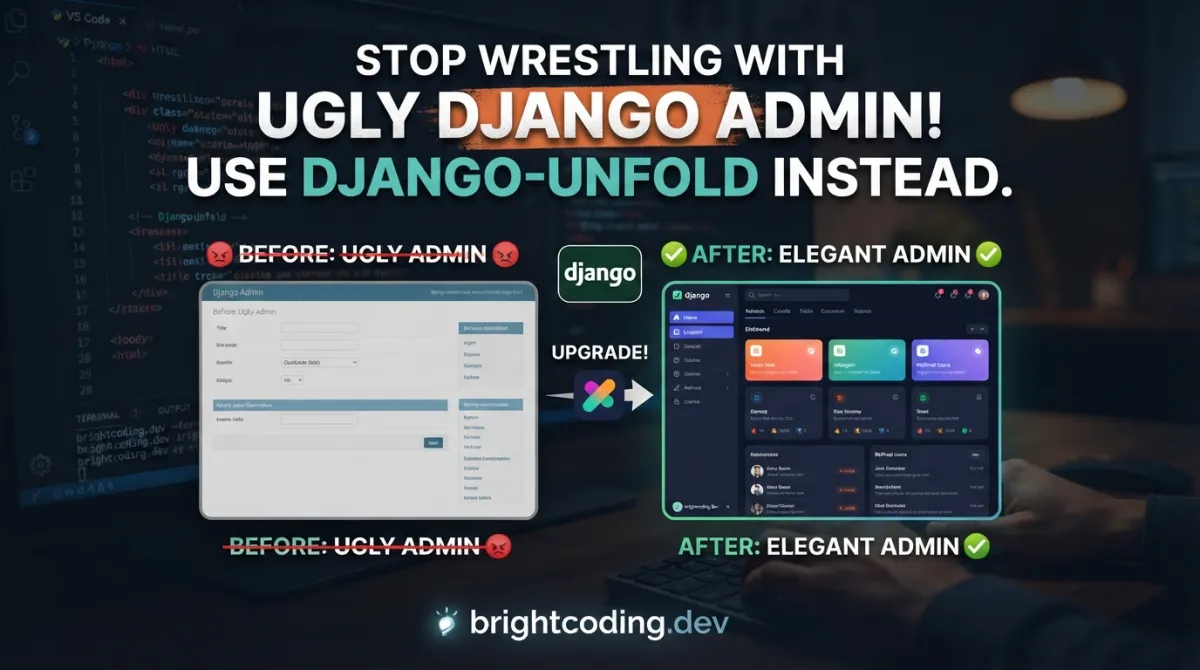
Let's be brutally honest for a second. You've built an incredible Django application. Your models are elegant, your API is RESTful, your business logic is pristine. But then... you open the Django admin panel. That gray, boxy interface that looks like it time-traveled from 2005. Your stakeholders wince. Your clients ask if this is "the final design." Your internal team dreads every backoffice task.
What if I told you there's a way to transform that clunky admin into a breathtaking, modern dashboard—without rewriting a single model?
Enter django-unfold, the secret weapon top Django developers are deploying right now. This isn't another half-baked theme that breaks your workflows. It's a complete visual and functional revolution built on top of django.contrib.admin, leveraging the power of Tailwind CSS↗ Bright Coding Blog to deliver an admin experience that rivals custom-built internal tools costing tens of thousands of dollars.
In this deep dive, I'll expose exactly how django-unfold works, why it's exploding in popularity (check those PyPI download numbers!), and how you can deploy it in your project before your next coffee break. Whether you're maintaining a legacy Django monolith or launching a greenfield SaaS, this guide will change how you think about Django admin forever.
What is django-unfold?
django-unfold is a modern Django admin theme and toolkit created by the team at unfoldadmin.com. It reimagines the default Django administration interface with a contemporary design system while preserving every ounce of functionality that makes Django admin so powerful.
Unlike previous admin customization attempts that required fragile template overrides or complete admin replacements, django-unfold takes a fundamentally different approach: it enhances, rather than replaces. Built entirely on django.contrib.admin, it maintains compatibility with your existing ModelAdmin classes, custom actions, and third-party extensions. This architectural decision is genius—it means zero migration friction for existing projects.
The project is actively developed and continuously evolving, with new features and edge case handling added regularly. The community is vibrant, with an official Discord server where contributors and users collaborate. The documentation lives at unfoldadmin.com, and there's even a live demo site plus a dedicated demo repository so you can see the magic in action before committing.
What makes django-unfold genuinely trend-worthy? It's the incremental adoption path. You don't need to rebuild your admin from scratch. Drop it in, swap your ModelAdmin base class, and watch your interface transform instantly. For teams with existing Django codebases, this is the difference between a "maybe someday" project and a "deploy today" upgrade.
Key Features That Will Blow Your Mind
django-unfold isn't just a fresh coat of paint. It's a comprehensive toolkit for building professional internal applications. Here's what you're getting:
Visual Interface Powered by Tailwind CSS
The entire UI is built on Tailwind CSS, the utility-first framework that's dominated modern web development↗ Bright Coding Blog. This means responsive design, consistent spacing, and a professional aesthetic without custom CSS bloat. The interface feels like a premium SaaS product, not a framework default.
Dark Mode & Complete Theming
Toggle between light and dark modes instantly. Beyond that, customize color schemes, backgrounds, border radius, and font colors through configuration. Your admin can match your brand identity precisely.
Revolutionary Navigation Systems
- Sidebar navigation with icons and collapsible sections—no more hunting through top-level menus
- Inline tabs to group related inlines into clean tab navigation
- Model tabs for custom navigation within model admin pages
- Fieldset tabs that merge multiple fieldsets into elegant tabs
Advanced Data Interaction
- Command palette for lightning-fast model and data search (think VS Code's command palette)
- Advanced filters including custom dropdowns, autocomplete, numeric, datetime, and text field filters
- Infinite paginator for handling massive datasets without server-crushing load
- Paginated inlines to break large record sets into manageable pages
Developer Experience Enhancements
- Conditional fields that show/hide dynamically based on other field values
- Sortable inlines via drag-and-drop
- Changeform modes with compressed field display
- Environment labels to prevent dangerous production mistakes
- Language switcher built directly into the admin area
Dashboard & Visualization Tools
- Dashboard helpers for custom pages
- Reusable UI components: cards, buttons, charts
- Chart.js integration for data visualization
- Datasets for displaying custom changelists on detail pages
Form & Content Tools
- WYSIWYG editor via Trix
- Crispy forms integration with custom template pack
- Array widget for PostgreSQL↗ Bright Coding Blog ArrayField
- Nonrelated inlines for displaying unrelated models together
Real-World Use Cases Where django-unfold Dominates
1. SaaS Backoffice for Non-Technical Teams
Your customer success team needs to manage users, subscriptions, and support tickets. The default Django admin intimidates them. With django-unfold's sidebar navigation, command palette search, and clean visual hierarchy, non-technical staff navigate confidently. The dark mode reduces eye strain during long support shifts.
2. E-Commerce Operations Dashboard
Managing products, inventory, orders, and vendor relationships requires switching between dozens of models. django-unfold's tabbed fieldsets organize complex product forms, while sortable inlines let merchandisers drag product variants into priority order. Conditional fields show wholesale pricing fields only for B2B products.
3. Data-Heavy Analytics Platforms
When your admin needs to display millions of records, the infinite paginator and paginated inlines prevent timeout disasters. Dashboard components with Chart.js visualizations give stakeholders instant insights without exporting to Excel. The environment label ensures analysts never accidentally modify production data.
4. Multi-Tenant Internal Tools
Running Django admin for multiple clients or departments? Theming customization lets you brand each instance. The language switcher supports international operations teams. Parallel admin means you can run the default admin alongside Unfold during gradual rollouts—zero downtime migration.
5. Content Management Workflows
Editorial teams using Django need WYSIWYG editing (Trix integration), array widgets for tag management, and nonrelated inlines to attach media assets, SEO↗ Bright Coding Blog metadata, and publishing schedules to articles. The crispy forms integration ensures every form looks intentional, not accidental.
Step-by-Step Installation & Setup Guide
Ready to transform your admin? Here's the complete deployment path:
Step 1: Install the Package
# Standard installation
pip install django-unfold

# Or add to your requirements.txt
django-unfold>=0.x
Step 2: Configure INSTALLED_APPS
In your settings.py, django-unfold must come before django.contrib.admin:
INSTALLED_APPS = [
    "unfold",  # Must precede django.contrib.admin
    "django.contrib.admin",
    "django.contrib.auth",
    "django.contrib.contenttypes",
    # ... your other apps
]
Critical: The order matters. Unfold needs to register its templates before the default admin.
Step 3: Update Your ModelAdmin Classes
Replace django.contrib.admin.ModelAdmin with unfold.admin.ModelAdmin:
# admin.py
from django.contrib import admin
from unfold.admin import ModelAdmin  # Import Unfold's ModelAdmin

from .models import MyModel

@admin.register(MyModel)
class MyModelAdmin(ModelAdmin):  # Inherit from unfold.admin.ModelAdmin
    pass
That's the minimum viable integration. Your existing list_display, search_fields, inlines, and custom methods continue working unchanged.
Step 4: Configure Unfold Settings (Optional but Recommended)
Add Unfold configuration to your settings.py:
UNFOLD = {
    "SITE_TITLE": "My SaaS Admin",
    "SITE_HEADER": "My SaaS Administration",
    "SITE_SYMBOL": "speed",  # Material Symbols icon name
    "SHOW_HISTORY": True,
    "SHOW_VIEW_ON_SITE": True,
    "ENVIRONMENT": "production",  # Shows environment label
    "DARK_MODE": True,
    "THEME": "dark",  # or "light"
}
Step 5: Collect Static Files
python↗ Bright Coding Blog manage.py collectstatic
Step 6: Verify Your Deployment
Run your development server and navigate to /admin/. You should see the transformed interface immediately.
Migration note: Unfold works alongside the default Django admin. For gradual adoption, you can run both in parallel using the parallel admin configuration documented on their blog.
REAL Code Examples from the Repository
Let's examine actual code patterns from django-unfold's documentation and implementation.
Example 1: Basic ModelAdmin Registration
This is the fundamental pattern—notice how minimal the change is from standard Django:
from django.contrib import admin
from unfold.admin import ModelAdmin  # The critical import swap

@admin.register(MyModel)
class MyModelAdmin(ModelAdmin):
    pass
Before this code: Your model uses Django's default gray, table-heavy interface.
After this code: Instant Tailwind-styled interface with sidebar navigation, dark mode toggle, and all Unfold features available. The pass statement means you're running purely on defaults—yet the visual transformation is dramatic. This is the incremental adoption promise in action.
Example 2: Customizing the Sidebar Navigation
Unfold's sidebar configuration happens in settings.py:
UNFOLD = {
    "SITE_TITLE": "My Application",
    "SITE_HEADER": "My Application",
    "SITE_SYMBOL": "settings",  # Material Symbols icon identifier

    "SIDEBAR": {
        "show_search": True,  # Enable command palette search
        "navigation": [
            {
                "title": "Content Management",
                "separator": True,  # Visual divider in sidebar
                "items": [
                    {
                        "title": "Blog Posts",
                        "icon": "article",  # Material Symbols name
                        "link": "/admin/blog/post/",
                    },
                    {
                        "title": "Categories",
                        "icon": "folder",
                        "link": "/admin/blog/category/",
                    },
                ],
            },
            {
                "title": "User Management",
                "items": [
                    {
                        "title": "Users",
                        "icon": "person",
                        "link": "/admin/auth/user/",
                    },
                    {
                        "title": "Groups",
                        "icon": "group",
                        "link": "/admin/auth/group/",
                    },
                ],
            },
        ],
    },
}
This configuration creates organized, icon-rich navigation that transforms how users discover functionality. The show_search enables the command palette—hit a keyboard shortcut and jump to any model instantly. The separator visually groups related items. Each icon references Google's Material Symbols, giving your admin a cohesive icon system without custom SVG management.
Example 3: Advanced Filter Configuration
Unfold's filters go far beyond Django's defaults:
from django.contrib import admin
from unfold.admin import ModelAdmin
from unfold.contrib.filters.admin import (
    RangeNumericFilter,  # Slider-based numeric range
    SingleNumericFilter,  # Single numeric input
    SliderNumericFilter,  # Visual range slider
    DateTimeRangeFilter,  # Calendar picker for datetime ranges
    AutocompleteSelectFilter,  # Searchable dropdown
)

from .models import Product

@admin.register(Product)
class ProductAdmin(ModelAdmin):
    list_filter = [
        ("price", RangeNumericFilter),  # Slider from noUiSlider
        ("stock_quantity", SingleNumericFilter),
        ("created_at", DateTimeRangeFilter),
        ("category", AutocompleteSelectFilter),  # For large category sets
    ]

    list_filter_submit = True  # Requires explicit apply (prevents accidental loads)
Why this matters: Default Django filters create unwieldy vertical lists. For a product catalog with 10,000 categories, standard filters are unusable. The AutocompleteSelectFilter loads categories on-demand via AJAX. The RangeNumericFilter provides an intuitive slider for price ranges. list_filter_submit prevents the common pain point of accidental filter application on every selection change—critical for large datasets where each filter reload is expensive.
Example 4: Dashboard Component with Charts
from django.shortcuts import render
from unfold.sites import UnfoldAdminSite

class CustomAdminSite(UnfoldAdminSite):
    def index(self, request, extra_context=None):
        # Add custom chart data to the dashboard context
        extra_context = extra_context or {}
        extra_context.update({
            "revenue_data": [12000, 19000, 15000, 25000, 22000, 30000],
            "user_growth": [150, 230, 380, 520, 690, 850],
        })
        return super().index(request, extra_context)

# In your dashboard template, use Unfold's card and chart components:
# {% component "unfold/components/card.html" with title="Monthly Revenue" %}
#   <canvas id="revenueChart" data-values="{{ revenue_data|join:',' }}"></canvas>
# {% endcomponent %}
This pattern leverages Unfold's component system and Chart.js integration to build executive dashboards without leaving the admin ecosystem. The UnfoldAdminSite extension point mirrors Django's standard customization pattern—familiar to any Django developer.
Advanced Usage & Best Practices
Parallel Admin Migration Strategy
Don't rip and replace on day one. Use parallel admin to run Unfold alongside your existing admin:
# urls.py
from django.contrib import admin
from unfold.sites import UnfoldAdminSite

# Default admin (preserved)
admin.autodiscover()

# Unfold admin (new)
unfold_admin = UnfoldAdminSite(name="unfold_admin")
unfold_admin.register(MyModel, MyUnfoldModelAdmin)

urlpatterns = [
    path("admin/", admin.site.urls),           # Legacy access
    path("unfold/", unfold_admin.urls),        # New experience
]
This lets stakeholders preview Unfold, you validate all custom functionality, and you migrate users gradually.
Performance Optimization
- Use
list_filter_submit = Truefor expensive filters - Enable
paginated_inlinesfor relationships with 100+ records - Leverage
infinite_paginatorfor tables exceeding 10,000 rows - Configure
select_relatedandprefetch_relatedinget_queryset()as always
Third-Party Integration Priority
If you use django-import-export, django-guardian, or django-simple-history, check Unfold's integration guides before customizing. The maintainers have solved common styling conflicts already.
Comparison with Alternatives
| Feature | django-unfold | django-jazzmin | django-grappelli | Custom Admin |
|---|---|---|---|---|
| Base Architecture | Extends django.contrib.admin |
Extends admin | Extends admin | Complete replacement |
| CSS Framework | Tailwind CSS | Bootstrap 4/5 | Custom CSS | Varies |
| Dark Mode | ✅ Built-in | ✅ Yes | ❌ No | Build yourself |
| Incremental Adoption | ✅ Zero migration | ⚠️ Some friction | ⚠️ Some friction | ❌ Full rebuild |
| Command Palette | ✅ Yes | ❌ No | ❌ No | Build yourself |
| Third-Party Support | ✅ 10+ packages | Moderate | Moderate | N/A |
| Active Development | ✅ Very active | Moderate | Slow | Your problem |
| Commercial Support | ✅ Available | ❌ No | ❌ No | Expensive |
| Dashboard Components | ✅ Built-in | Limited | Limited | Build yourself |
| Parallel Admin | ✅ Supported | ❌ No | ❌ No | ❌ No |
The verdict: django-jazzmin is solid for Bootstrap-centric teams but lacks Unfold's modern component architecture. Grappelli shows its age with limited mobile responsiveness and no dark mode. Custom admin builds give maximum flexibility but consume months of development. django-unfold hits the sweet spot: professional results, minimal time investment, preserved Django conventions.
FAQ
Is django-unfold compatible with my existing Django admin customizations?
Yes. Because Unfold extends django.contrib.admin, your custom ModelAdmin methods, actions, inlines, and templates continue working. The only required change is inheriting from unfold.admin.ModelAdmin instead of admin.ModelAdmin.
Does django-unfold require migrating my database?
No. Unfold is purely a presentation layer enhancement. Zero migrations needed. Zero model changes required.
Can I use django-unfold with Django 4.x and 5.x?
Yes. The project actively tracks Django's release schedule. Check PyPI for specific version compatibility, but modern Django versions are fully supported.
How do I customize colors to match my brand?
Unfold exposes comprehensive theming through the UNFOLD settings dictionary. Customize primary colors, backgrounds, borders, and fonts without writing CSS. For deeper customization, the Tailwind foundation means standard utility classes work everywhere.
Is commercial support available?
Yes. The Unfold team offers consulting, support packages, and studio services for advanced dashboards and customizations. This is unique among admin theme projects.
What about mobile responsiveness?
Built on Tailwind CSS, Unfold is fully responsive. The sidebar collapses appropriately, tables scroll horizontally, and touch targets meet accessibility standards.
Can I contribute to django-unfold?
Absolutely. Join the Discord community, check GitHub issues, and submit pull requests. The project welcomes contributions.
Conclusion: Your Admin Deserves Better
Here's the uncomfortable truth: every day you spend with Django's default admin, you're communicating something to your users and stakeholders. You're saying internal tools don't matter. You're accepting friction that kills productivity. You're leaving visual credibility on the table.
django-unfold demolishes these compromises. In under ten minutes, you transform a liability into an asset. Your team gets modern tools they actually enjoy using. Your stakeholders see a product that matches your engineering quality. And you—the developer—keep every ounce of Django's proven admin architecture.
The GitHub repository is waiting. The live demo proves what's possible. The documentation holds your hand through every configuration.
Stop wrestling with ugly Django admin. Your future self—and every user who opens your admin panel—will thank you.
⭐ Star django-unfold on GitHub | 🚀 View the Live Demo | 💬 Join the Discord Community
Outils recommandés
Explore on the BrightCoding network
Hand-picked resources from our other sites.
Web Flight Simulator: The Browser Aviation Tool
Web Flight Simulator delivers high-fidelity aerial combat in your browser using Three.js and CesiumJS. Explore real-world terrain, master F-15 weapons systems,...
Turn Any Database Into a Spreadsheet in 5 Minutes: The Complete NocoDB Guide for 2026
Transform your SQL databases into powerful, collaborative spreadsheets without writing a single line of code. Learn how NocoDB helps 50,000+ teams visualize MyS...
Filerobot Image Editor: The Essential Tool Every Developer Needs
Filerobot Image Editor is a powerful, free, open-source library that integrates professional image editing into web applications. Learn installation, advanced u...
Continuez votre lecture

The Generative UI Revolution: How Tambo AI is Transforming React Development Forever
Build Stunning 3D Maps with Three.js: The Ultimate 2026 Developer Guide

Run a Powerful DeFi Trading Bot from a Single HTML File

Stop Coding Alone: OPC-Skills Gives Your AI Agent Superpowers
Commentaires 0
Aucun commentaire pour l'instant. Soyez le premier à réagir !