zenml-io/zenml: One Open-Source Platform for ML Pipelines to AI Agents
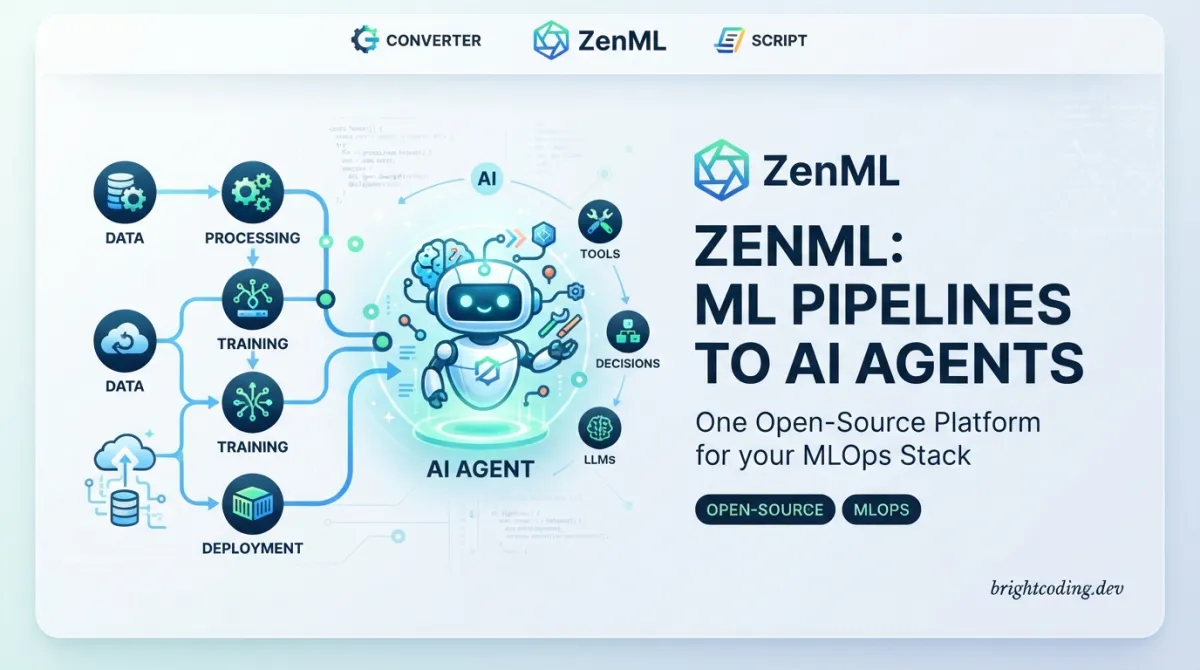
zenml-io/zenml: One Open-Source Platform for ML Pipelines to AI Agents
Most ML engineers have been there: a training script that works perfectly on a laptop falls apart in production. Experiment tracking lives in one tool, model deployment in another, and monitoring somewhere else entirely. When LLMs and AI agents entered the picture, the fragmentation only worsened—LangGraph for orchestration, Langfuse for observability, separate infrastructure for classical ML, and yet more glue code to hold it together.
zenml-io/zenml addresses this by providing a single, open-source platform that spans traditional machine learning pipelines to modern AI agent workflows. With 5,482 GitHub stars, 635 forks, and an Apache 2.0 license, it is built for ML and AI engineers working in production environments who need infrastructure abstraction without vendor lock-in.
This article examines what zenml-io/zenml actually does, how it structures workflows, and whether it fits your stack.
What is zenml-io/zenml?
zenml-io/zenml is a Python↗ Bright Coding Blog-based, open-source MLOps and AI orchestration platform maintained by ZenML GmbH. Its core proposition is straightforward: write workflows (called pipelines) that run on any infrastructure backend (called stacks). These pipelines can contain any Pythonic logic—training a scikit-learn model, running a PyTorch distributed job, or executing an agentic loop with LangGraph.
The project sits at the intersection of several evolving technical categories: MLOps orchestration, LLMOps tooling, and emerging agent infrastructure. What distinguishes it from narrower tools is its explicit design for both classical ML and AI agent workflows within the same framework. The README states this directly: "ZenML is built for ML or AI Engineers working on traditional ML use-cases, LLM workflows, or agents, in a company setting."
Key architectural decisions reflect this dual focus:
- Client-server architecture: Local development runs both client and server; production deploys the server separately with lightweight clients connecting via
zenml login - Integrated web dashboard: Separate repository at zenml-io/zenml-dashboard for visualization
- Containerization automation: Code is automatically containerized and tracked without manual Dockerfile management
- Stack abstraction: Infrastructure complexity is hidden behind configurable backends
The platform is actively maintained with the last commit dated July 15, 2026, and is used by companies including Airbus, AXA, JetBrains, Rivian, WiseTech Global, Brevo, Leroy Merlin, Koble, Playtika, NielsenIQ, and Enel.
Key Features
Pipeline Orchestration with Infrastructure Abstraction
At its core, zenml-io/zenml lets you define pipelines using Python decorators. The framework handles containerization, dependency tracking, and execution across environments. You write @step functions; ZenML determines how they run—locally, on Kubernetes, or on managed services like SageMaker or GCP Vertex.
Automatic Tracking and Observability
Every pipeline run is tracked with metrics, logs, and metadata. This is not bolted-on observability; it is intrinsic to the execution model. The framework captures artifact lineage, step outputs, and execution history without requiring explicit instrumentation.
Stack System for Tool Integration
ZenML integrates with existing tools rather than replacing them. The README explicitly mentions MLflow, LangGraph, Langfuse, SageMaker, and GCP Vertex. This is achieved through a stack system where you configure orchestrators, artifact stores, container registries, and experiment trackers independently.
Development-to-Production Continuity
The same pipeline code runs in development and production. Local execution uses pip install "zenml[local]"; production connects to a deployed server. This eliminates the common "works on my machine" translation layer.
Agent and LLM Workflow Support
Beyond classical ML, ZenML explicitly supports LLM and agent workflows. The README highlights LangGraph integration, agent architecture comparisons, and durable agent execution through the related Kitaru project.
MCP Server for Conversational Interaction
The ZenML MCP Server enables querying pipelines, analyzing runs, and triggering deployments via natural language through Claude Desktop, Cursor, or other MCP-compatible clients. This transforms pipeline metadata into conversational insights without dashboard expertise.
Use Cases
Classical ML Production Pipelines
Teams running structured data models—churn prediction, fraud detection, demand forecasting—can define end-to-end pipelines with feature engineering, training, evaluation, and deployment steps. The E2E batch inference example demonstrates complete MLOps with feature engineering.
LLM Application Orchestration
RAG pipelines, fine-tuning workflows, and evaluation loops for LLMs are explicitly supported. The LLM RAG Pipeline example shows production RAG with evaluation loops; the Fine-tuning Pipeline example demonstrates LLM fine-tuning and deployment.
AI Agent Deployment
For teams building agentic systems, ZenML provides orchestration for agent loops, human-in-the-loop approval, and persistent state management. The Agent Architecture Comparison example uses LangGraph workflows with LiteLLM integration; the Agentic Workflow (Deep Research) example shows agent orchestration patterns.
Multi-Environment Experimentation
Data scientists can iterate locally with full observability, then promote the same pipeline to staging and production without code changes. The automatic containerization and tracking remove manual overhead.
Cross-Tool Standardization
Organizations with fragmented ML tooling—MLflow for tracking, Kubernetes for compute, custom scripts for deployment—can unify orchestration while keeping their preferred tools. ZenML acts as the integration layer.
Installation & Setup
The README provides explicit installation paths. Reproduce these exactly:
Install with server capabilities:
pip install "zenml[server]"
Note: pip install zenml installs a slimmer client-only version. Use the [server] extra for local server functionality.
Initialize your repository:
zenml init
This creates the local ZenML configuration and metadata store.
Start local server or connect to remote:
zenml login
For production deployments, install the client only and specify the server URL:
pip install zenml
zenml login <server-url>
The architecture distinguishes two modes:
- Local Development:
pip install "zenml[local]"— runs both client and server locally - Production: Deploy server separately via Helm or other methods, connect with lightweight client
After setup, explore the examples directory. The quickstart is recommended for understanding core concepts: pipelines, steps, artifacts, snapshots, and deployments.
Real Code Examples
The README does not contain extensive inline code snippets for pipeline definition. This reflects the current documentation structure, which points to external examples rather than embedding full implementations. Below are the concrete code elements present, with explanation of how they fit into the broader workflow.
Basic Installation and Initialization:
# Install ZenML with server capabilities
pip install "zenml[server]"  # pip install zenml will install a slimmer client

# Initialize your ZenML repository
zenml init

# Start local server or connect to a remote one
zenml login
This sequence establishes the local environment. The zenml init command creates the project structure; zenml login starts or connects to the metadata server that tracks all pipeline executions.
Kitaru Durable Agent Decorators:
For agent workflows, the related Kitaru project (built on the same infrastructure) uses minimal decorator syntax:
# Kitaru: two decorators for durable agents
# @flow + @checkpoint

# Crash recovery — checkpoint and replay from failure
# Human-in-the-loop — built-in approval gates
# Persistent memory — versioned, durable state
While the README shows this as pseudocode-style documentation, the actual implementation follows this pattern. The @flow decorator defines the agent execution graph; @checkpoint enables durable state persistence across failures.
MCP Server Natural Language Queries:
The MCP integration enables conversational interaction with pipeline metadata:
💬 "Which pipeline runs failed this week and why?"
📊 "Show me accuracy metrics for all my customer churn models"
🚀 "Trigger the latest fraud detection pipeline with production data"
These are not code examples per se, but demonstrate the query interface. Setup requires:
# 1. Download .dxt file from github.com/zenml-io/mcp-zenml
# 2. Drag into Claude Desktop settings
# 3. Add ZenML server URL and API key
# 4. Start querying
The README emphasizes that these capabilities transform pipeline debugging into conversational access without requiring dashboard navigation expertise.
Advanced Usage & Best Practices
Stack Configuration for Production
The stack system is where production readiness happens. Configure your orchestrator (Kubernetes, Kubeflow, Airflow), artifact store (S3, GCS, Azure Blob), and experiment tracker (MLflow, Weights & Biases) as separate, swappable components. This lets you run identical pipeline code against local Docker↗ Bright Coding Blog in development and EKS in production.
Versioning and Reproducibility
ZenML's automatic containerization and code snapshotting mean pipeline runs are reproducible by default. Lean into this: tag important runs, use artifact versioning, and treat pipeline code with the same discipline as application code.
Integration Strategy
The README's FAQ explicitly addresses a common anti-pattern: ZenML orchestrates your tools, it does not replace them. Keep using scikit-learn, PyTorch, LangGraph, or LlamaIndex. Wrap existing code in @step decorators rather than rewriting.
Agent Durability Considerations
For production agent systems, evaluate Kitaru alongside ZenML. The checkpoint/replay semantics and human-in-the-loop gates solve real failure modes that pure orchestration does not address. The shared infrastructure means skills transfer between the two tools.
Observability Without Dashboard Lock-in
The MCP Server integration is particularly valuable for teams where not all members need full dashboard access. Natural language querying lowers the barrier for stakeholders while maintaining audit trails.
Comparison with Alternatives
| Dimension | zenml-io/zenml | MLflow | LangSmith / Langfuse |
|---|---|---|---|
| Primary scope | Full MLOps/LLMOps orchestration | Experiment tracking + model registry | LLM observability |
| Pipeline execution | Native, with infrastructure abstraction | Limited (MLflow Pipelines) | None |
| Classical ML | Full support | Strong | Not applicable |
| Agent workflows | Explicit support via LangGraph, Kitaru | Not designed for | Observability only |
| Infrastructure management | Stack abstraction | None | None |
| Open-source license | Apache 2.0 | Apache 2.0 | Mixed (LangSmith is proprietary) |
MLflow excels at experiment tracking and model registry. ZenML incorporates MLflow as one stack component but adds orchestration, infrastructure abstraction, and agent support. The README directly addresses this: "MLflow tracks experiments. We orchestrate the entire development process."
LangSmith and Langfuse provide excellent LLM observability—prompt tracking, latency analysis, cost attribution. ZenML's differentiation is orchestrating the full lifecycle, not just observing it. They complement rather than replace each other.
Kubeflow Pipelines offers Kubernetes-native orchestration but with steeper setup and no native LLM/agent abstractions. ZenML's stack system can use Kubeflow as an orchestrator while providing higher-level pipeline semantics.
FAQ
Q: Do I need to rewrite existing agents or models?
A: No. Wrap existing code in @step. Keep using scikit-learn, PyTorch, LangGraph, or raw API calls.
Q: How does this differ from LangSmith or Langfuse? A: They provide LLM observability. ZenML orchestrates the full MLOps lifecycle for both classical ML and AI agents.
Q: Can I keep my MLflow or Weights & Biases setup? A: Yes. ZenML integrates with both as stack components. Your experiments, their pipelines.
Q: Is there a cost for the open-source version? A: No. The open-source version is free forever. You provide infrastructure; ZenML orchestrates it.
Q: How do I deploy with Kubernetes? A: Use the native Kubernetes orchestrator, Kubeflow, or other K8s-based orchestrators. Helm deployment documentation is available.
Q: What's the difference between zenml and zenml[server]?
A: zenml is the slim client. zenml[server] includes local server capabilities for development.
Q: Is there a VS Code extension? A: Yes. Available on the VS Code Marketplace as "ZenML.zenml-vscode" for pipeline management from your editor.
Conclusion
zenml-io/zenml is a pragmatic choice for teams tired of stitching together fragmented ML and AI infrastructure. Its core bet—that classical MLOps and emerging agent workflows share common orchestration needs—is increasingly validated by production usage at companies like Airbus, JetBrains, and Rivian.
The framework rewards teams who want infrastructure abstraction without giving up tool choice. If you are already invested in MLflow, Kubernetes, or LangGraph, ZenML integrates rather than displaces. If you are building AI agents that need durability and human oversight, the Kitaru extension provides a clear path.
The open-source Apache 2.0 license and active maintenance (last commit July 2026) reduce adoption risk. For teams ready to unify their ML and AI pipelines under one orchestration layer, zenml-io/zenml on GitHub is the starting point.
For related reading on MLOps pipeline patterns, see [INTERNAL_LINK: mlops-pipeline-design-patterns].
Outils recommandés
Explore on the BrightCoding network
Hand-picked resources from our other sites.
agentscope-ai/ReMe: File-Based Memory Layer for AI Agents
ReMe is a local-first memory management kit for AI agents that stores conversations and resources as editable Markdown files with frontmatter and wikilinks. Fea...
mrexodia/ida-pro-mcp: AI-Powered Reverse Engineering via MCP
mrexodia/ida-pro-mcp is an MIT-licensed MCP server that bridges IDA Pro with language models for AI-assisted reverse engineering. Supports 24+ clients, headless...
yoshiko-pg/difit: Local Git Diff Viewer with AI Prompt Generation
yoshiko-pg/difit is a 2,983-star MIT-licensed CLI tool that renders Git diffs in a local GitHub-style web UI with AI-ready comment prompts. Built in TypeScript...
Continuez votre lecture
Robin: The Revolutionary AI Tool for Dark Web Investigations

Robin: The Revolutionary AI OSINT Tool for Dark Web Investigations
Rdio Scanner: The Revolutionary SDR Audio Distribution System

Stop Coding Alone: OPC-Skills Gives Your AI Agent Superpowers
Commentaires 0
Aucun commentaire pour l'instant. Soyez le premier à réagir !